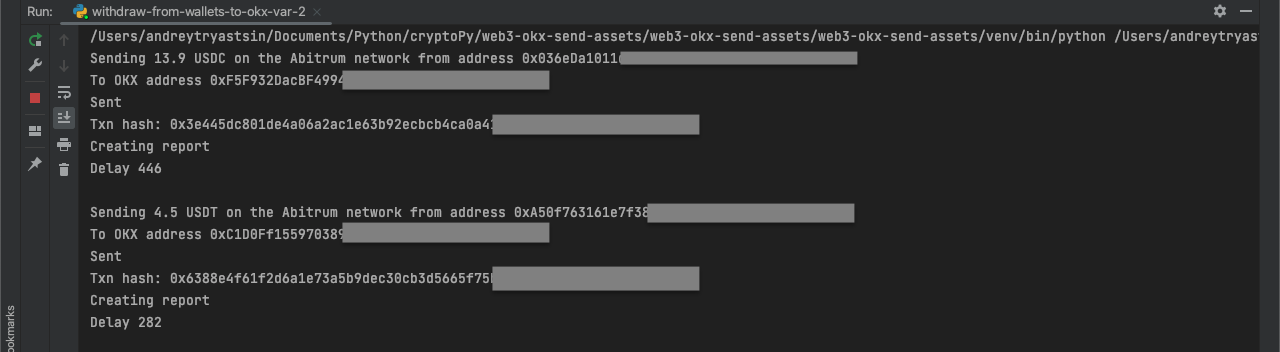
Sending crypto from OKX to wallets and sending from wallets to sub-Accounts
Contents:
- How to use code from the article
- Preparing for exchange interaction
- API connection options
- Option 1 - connection using requests
- Option 2 - connection using the Okx library
- Part 1 - sending crypto from OKX to wallets
- Getting coin information - script get-assets-info.py
- Option 1 - send a single type of coin in equal amounts to wallets - script withdraw-from-okx-to-wallets-var-1.py
- Script for calculating the required balance amount - count-withdrawal-cost-from-okx.py
- Option 2 - customized send: different coins in different amounts to wallets - script withdraw-from-okx-to-wallets-var-2.py
- Part 2 - sending crypto from wallets to OKX sub-accounts
- Option 1 - sending native coins - script withdraw-from-wallets-to-okx-var-1.py"
- Option 2 - sending tokens, such as stablecoins - script withdraw-from-wallets-to-okx-var-2.py
How to use code from the article
Instructions on how to run .py and .ipynb files are provided in the guide.
Download the repository from GitHub. It contains 4 scripts:
-
withdraw-from-okx-to-wallets-var-1.py - for sending one type of coin in equal amounts to wallets. This script uses the following files:
-
The list of recipient addresses in Excel: wallet_addresses_var_1.xlsx or in TXT: wallet_addresses_var_1.txt.
-
The script's results are recorded in the Excel report: report_table_var_1.xlsx.
-
withdraw-from-okx-to-wallets-var-2.py - Customized sending: different coins in different amounts to wallets. This script uses the following files:
-
Settings for sending (address, coin name, quantity, fee, network) in Excel format: sending_settings_var_2.xlsx or in TXT format: sending_settings_var_2.txt.
-
The script's results are recorded in the Excel report: report_table_var_2.xlsx.
-
withdraw-from-wallets-to-okx-var-1.py - Sending native coins from wallets to exchange sub-accounts. This script uses the following files:
-
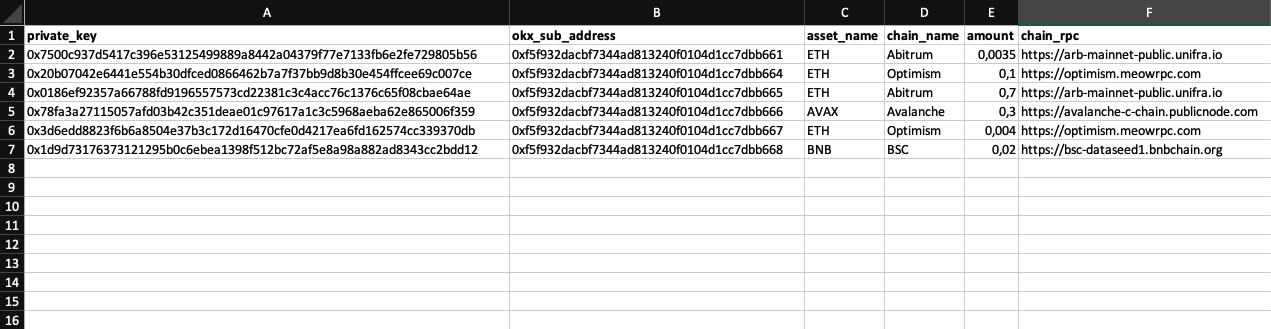
Settings for sending (wallet private key, OKX address, coin name, network name, quantity, RPC URL) in Excel format: sending_from_wallets_settings_var_1.xlsx or in TXT format: sending_from_wallets_settings_var_1.txt.
-
The script's results are recorded in the Excel report: report_table_var_sending_from_wallets_1.xlsx.
-
withdraw-from-wallets-to-okx-var-2.py - Sending tokens, such as stablecoins, from wallets to exchange sub-accounts. This script uses the following files:
-
Settings for sending (wallet private key, OKX address, coin name, network name, smart contract address, quantity, RPC URL) in Excel format: sending_from_wallets_settings_var_2.xlsx or in TXT format: sending_from_wallets_settings_var_2.txt.
-
ABI for working with sending ERC20 tokens in JSON format: ERC20_ABI.json.
-
The script's results are recorded in the Excel report: report_table_var_sending_from_wallets_2.xlsx.
-
get-assets-info.py - script for obtaining information about coins available on OKX, including name, network name, minimum and maximum fees. The result is exported to assets_settings.xlsx.
-
count-withdrawal-cost-from-okx.py - script for a preliminary calculation of the required balance amount, taking fees into account, in order to perform sending in the script withdraw-from-okx-to-wallets-var-1.py.
Preparing for exchange interaction
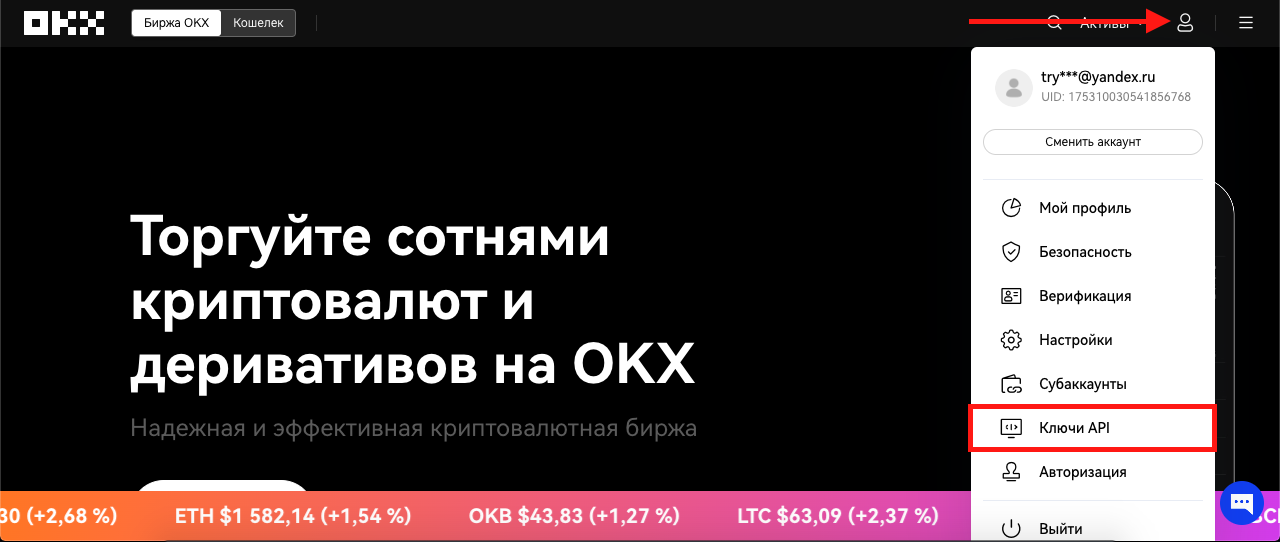
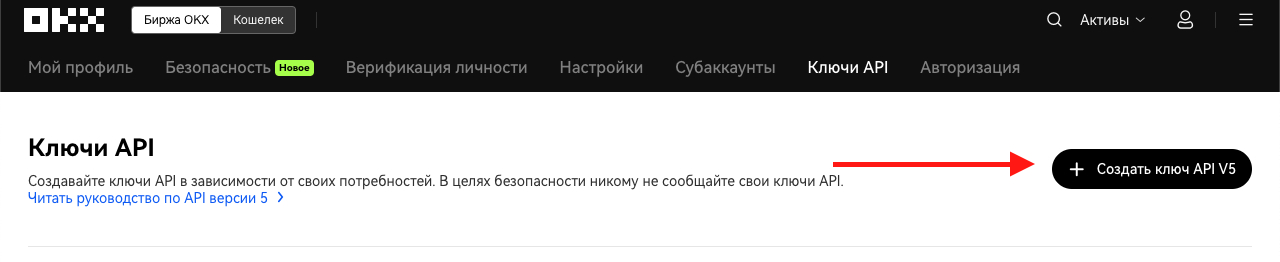
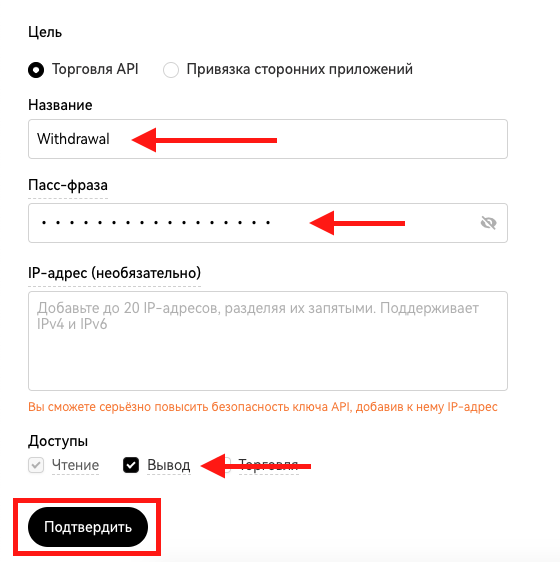
API connection options
API_KEY = '8gb2d2f2-274b-455d-967e-9fdcb490f46c'

SECRET_KEY = 'D27A0AA2C55BC18B15055580921E56209'

PASSPHRASE = 'secret_phrase'
Option 1 - connection using requests
Documentation: https://www.okx.com/docs-v5/en/?python#overview-rest-authentication
Code taken from here: https://stackoverflow.com/questions/66486374/how-to-sign-an-okex-api-request
import requests

import json

import datetime


import hmac

import base64
OKX_DOMAIN = 'https://www.okx.com'
ENDPOINT = '/api/v5/asset/balances'
def get_time():

    now = datetime.datetime.utcnow()

    timestamp = now.isoformat("T", "milliseconds")

    return timestamp + "Z"
def signature(timestamp, method, endpoint, body, secret_key):

    if str(body) == '{}' or str(body) == 'None':

        body = ''

    message = str(timestamp) + str.upper(method) + endpoint + str(body)

    mac = hmac.new(bytes(secret_key, encoding='utf8'), bytes(message, encoding='utf-8'), digestmod='sha256')

    d = mac.digest()

    return base64.b64encode(d)
def get_header():

    body= {}

    method= 'GET'

    header = dict()

    header['CONTENT-TYPE'] = 'application/json'

    header['OK-ACCESS-KEY'] = API_KEY

    header['OK-ACCESS-SIGN'] = signature(get_time(), method, ENDPOINT, body, SECRET_KEY)

    header['OK-ACCESS-TIMESTAMP'] = str(get_time())

    header['OK-ACCESS-PASSPHRASE'] = PASSPHRASE

    return header
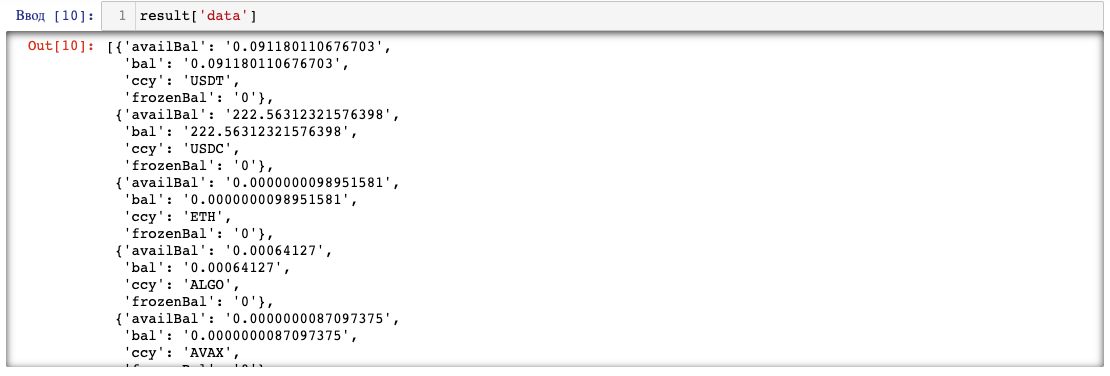
Connection
url = OKX_DOMAIN + ENDPOINT

header = get_header()

response= requests.get(url, headers=header)
result = response.json()
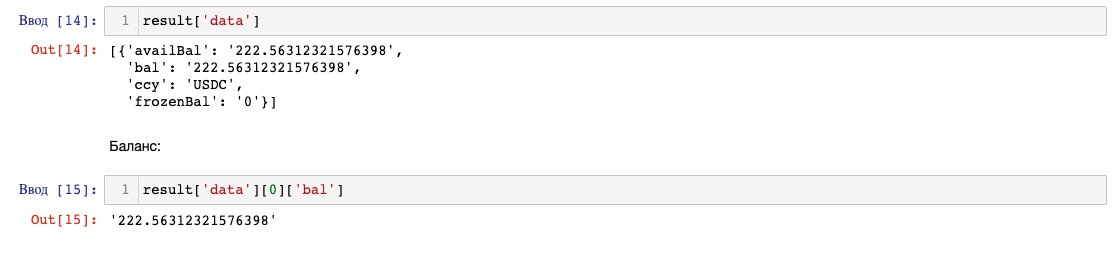
Checking for a specific asset
ENDPOINT = '/api/v5/asset/balances?ccy=USDC'
url = OKX_DOMAIN + ENDPOINT

header = get_header()

response= requests.get(url, headers=header)
result = response.json()
Option 2 - connection using the Okx library
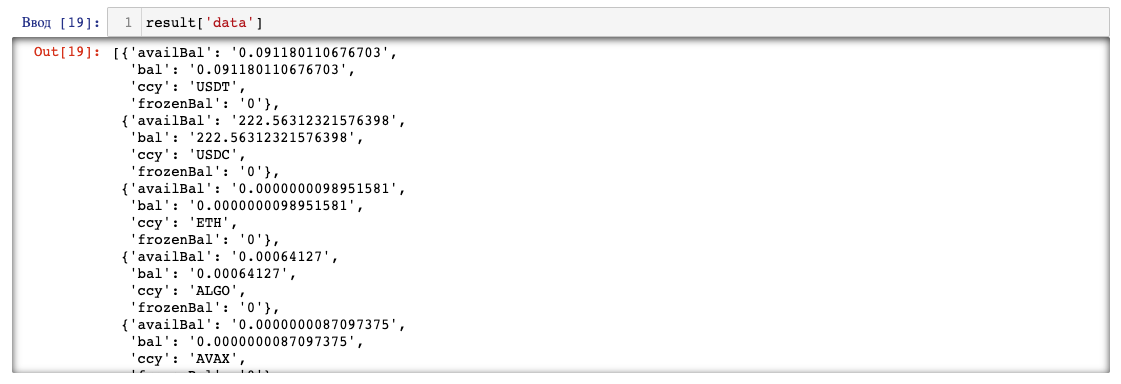
Okx provides the library https://pypi.org/project/python-okx/, which reduces the amount of code and makes the work a bit more convenient.
Using the okx library, we will perform a similar task that was previously solved using requests.
import okx.Funding as Funding
funding_api = Funding.FundingAPI(API_KEY, SECRET_KEY, PASSPHRASE, False, '0')
result = funding_api.get_balances()
Checking for a specific asset
result = funding_api.get_balances('USDC')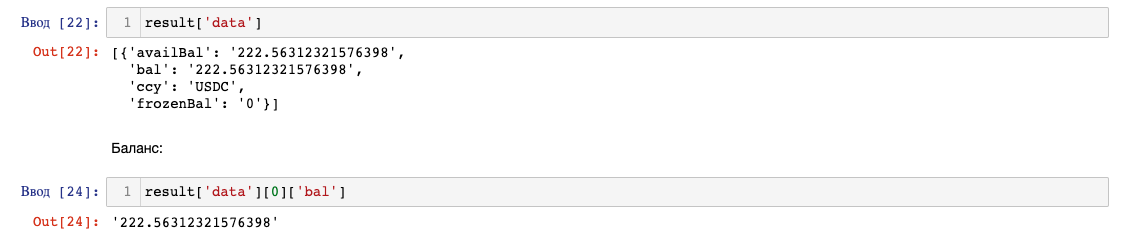
Part 1 - sending crypto from OKX to wallets
Preparation
-
You need to add withdrawal addresses through the personal account. I couldn't find a way to add addresses via the API :(
Instructions: https://www.okx.com/ru/help/10270095472397
If you will be adding EVM addresses to send assets to any EVM network in the future, select the address type as 'EVM Address' when adding the address. Check the 'Save address as verified...' option. -
To send coins to wallets, you need to know the network designation to which the asset will be sent and the fee amount. You can find out the network name through the personal account's withdrawal section.
-
Or obtain all the information through the API:
import pandas as pd

import okx.Funding as Funding
API_KEY = '8gb2d2f2-274b-455d-967e-9fdcb490f46c'

SECRET_KEY = 'D27A0AA2C55BC18B15055580921E56209'

PASSPHRASE = 'secret_phrase'
fundingAPI = Funding.FundingAPI(API_KEY, SECRET_KEY, PASSPHRASE, False, '0')
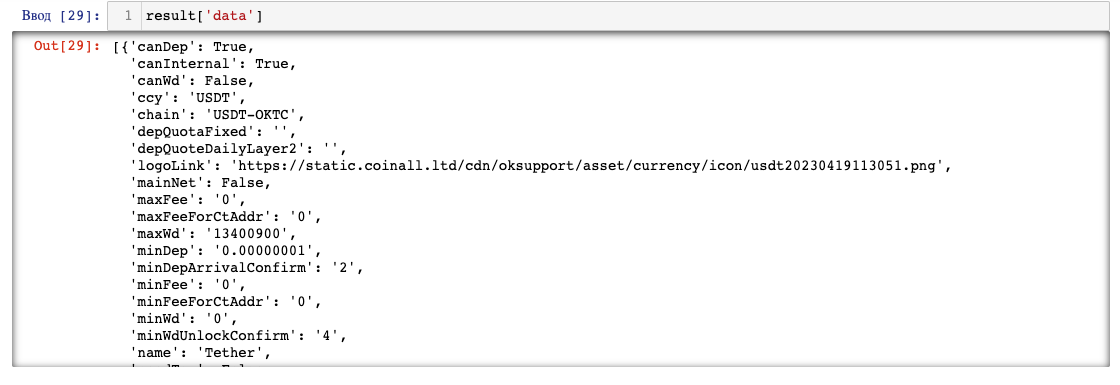
Getting information about assets.
Documentation: https://www.okx.com/docs-v5/en/?python#funding-account-rest-api-get-currencies
result = fundingAPI.get_currencies()
list_of_dicts = []

for element in range(len(result['data'])):

    dictionary = dict()

    dictionary['asset_name'] = result['data'][element]['ccy']

    dictionary['chain_name'] = result['data'][element]['chain']

    dictionary['min_fee'] = result['data'][element]['minFee']

    dictionary['max_fee'] = result['data'][element]['maxFee']

    list_of_dicts.append(dictionary)
df = pd.DataFrame.from_dict(list_of_dicts)
writer_kernel = pd.ExcelWriter('assets_settings.xlsx', engine='xlsxwriter')

df.to_excel(writer_kernel, index=False)

writer_kernel.close()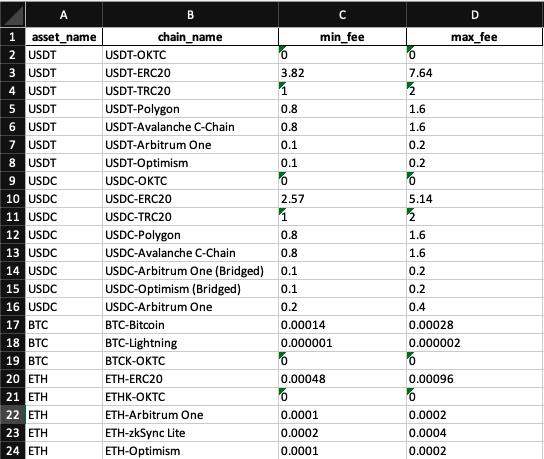
Option 1 - send a single type of coin in equal amounts to wallets
Required libraries
import random

import time


import pandas as pd


import okx.Funding as Funding
Settings
API_KEY = '8gb2d2f2-274b-455d-967e-9fdcb490f46c'

SECRET_KEY = 'D27A0AA2C55BC18B15055580921E56209'

PASSPHRASE = 'secret_phrase'
SETTINGS_XLSX = 'wallet_addresses_var_1.xlsx'
SETTINGS_TXT = 'wallet_addresses_var_1.txt'
ASSET_NAME = 'USDC'
CHAIN_NAME = 'USDC-Arbitrum One (Bridged)'
FEE = 0.1
TOTAL_SENDING_AMOUNT = 50
Additional Settings
It's a good idea to add some uniqueness to the transactions, which can affect the sent amount and the time delay between transactions.
For the delay between transactions, you need to set a minimum delay time and a maximum delay time. A random number will be selected from within this range.
MIN_TIMESLEEP_BETWEEN_TRANSACTIONS = 240
MAX_TIMESLEEP_BETWEEN_TRANSACTIONS = 480
MIN_VALUE_IN_RANGE_DIVIDER = 10000
MAX_VALUE_IN_RANGE_DIVIDER = 100
WALLETS_QUANTITY = 10
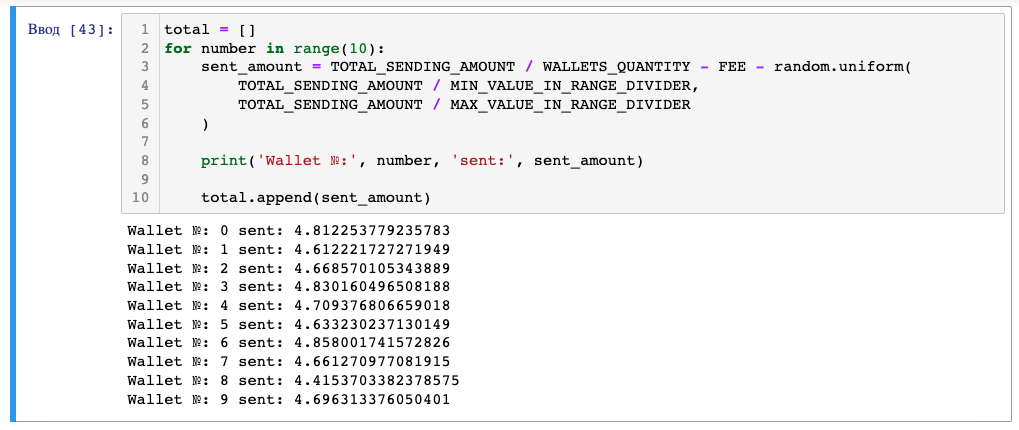
For example, I am planning to distribute 50 USDC (TOTAL_SENDING_AMOUNT) across 10 wallets (WALLETS_QUANTITY).
The amount of cryptocurrency sent to each wallet will be determined as follows:
The total amount for all wallets is divided by the number of wallets, minus the transaction fee, minus a random number.
TOTAL_SENDING_AMOUNT / WALLETS_QUANTITY - FEE - random.uniform(TOTAL_SENDING_AMOUNT / MIN_VALUE_IN_RANGE_DIVIDER,

                                                               TOTAL_SENDING_AMOUNT / MAX_VALUE_IN_RANGE_DIVIDER)
total = []

for number in range(10):

    sent_amount = TOTAL_SENDING_AMOUNT / WALLETS_QUANTITY - FEE - random.uniform(

        TOTAL_SENDING_AMOUNT / MIN_VALUE_IN_RANGE_DIVIDER,

        TOTAL_SENDING_AMOUNT / MAX_VALUE_IN_RANGE_DIVIDER

    )


    print('Wallet №:', number, 'sent:', sent_amount)


    total.append(sent_amount)

REPORT_NAME = 'report_table_var_1.xlsx'
Functions for creating report
Additionally, I will write a function that creates a report and saves it in an XLSX file. It will include the wallet address, the sent amount, and a field with the transaction code and error description if the transaction is rejected.
The excel_export function records data in an Excel file. It takes a data table (DataFrame) and the desired report name as inputs.
def excel_export(table, table_name):

    writer_kernel = pd.ExcelWriter(table_name, engine='xlsxwriter')

    table.to_excel(writer_kernel, index=False)

    writer_kernel.close()
def open_table():

    try:

        table = pd.read_excel(REPORT_NAME)


        return table.to_dict('records')


    except:

        table_template = pd.DataFrame(index=[0])

        excel_export(table_template, REPORT_NAME)

        created_table = pd.read_excel(REPORT_NAME)


        return created_table.to_dict('records')
def create_report(report_table, address, asset_name, chain, sent_amount, error):


    report_dict = dict()

    report_dict['address'] = address

    report_dict['asset_name'] = asset_name

    report_dict['chain'] = chain

    report_dict['sent_amount'] = sent_amount

    report_dict['error'] = error


    report_table.append(report_dict)


    result_table = pd.DataFrame.from_dict(report_table)


    result_table.dropna(inplace=True)


    excel_export(result_table, REPORT_NAME)
Loading wallet addresses
wallet_addresses_xlsx = pd.read_excel(SETTINGS_XLSX)
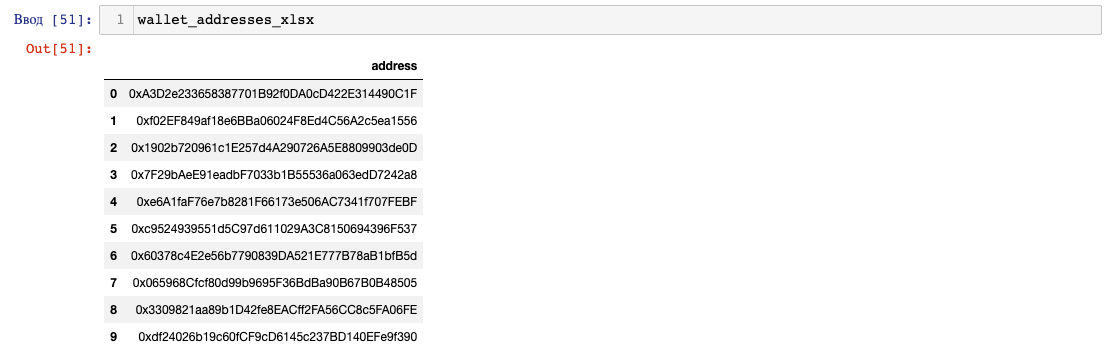
wallet_addresses_list = wallet_addresses_xlsx['address'].to_list()
with open(SETTINGS_TXT, 'r') as f:

    data = f.readlines()

    wallet_addresses_list = [adress.replace('\n', '') for adress in data]
Sending
fundingAPI = Funding.FundingAPI(API_KEY, SECRET_KEY, PASSPHRASE, False, '0')
-
ccy - coin name
-
toAddr - wallet address
-
amt - amount of coins
-
fee - transaction fee
-
dest - internal transfers or on-chain sending. We need "on-chain," which corresponds to parameter 4
-
chain - network name
-
On each iteration of the loop, the script takes a wallet address from the wallet_addresses_list.
-
The sending_amount is determined, which represents the amount of coins to send. It is calculated by dividing TOTAL_SENDING_AMOUNT by the number of wallets in the list and then subtracting a random number.
-
The fundingAPI.withdrawal function is used to execute a transaction, and the response is stored in api_response.
-
If the 'code' in the response equals 0, the transaction was successful, and a report is recorded in the XLSX file. If the 'code' is not equal to zero, an error occurred during the transaction. In this case, all data, error code, and error description are recorded in the report XLSX.
-
The script then sleeps for a period of time within a specified range.
-
If an error occurs within the loop, the except block is executed, and a report with the error is recorded.
for address in wallet_addresses_list:

    try:

        sending_amount = (TOTAL_SENDING_AMOUNT / len(wallet_addresses_list) -

                          FEE -

                          random.uniform(TOTAL_SENDING_AMOUNT / MIN_VALUE_IN_RANGE_DIVIDER,

                                         TOTAL_SENDING_AMOUNT / MAX_VALUE_IN_RANGE_DIVIDER))


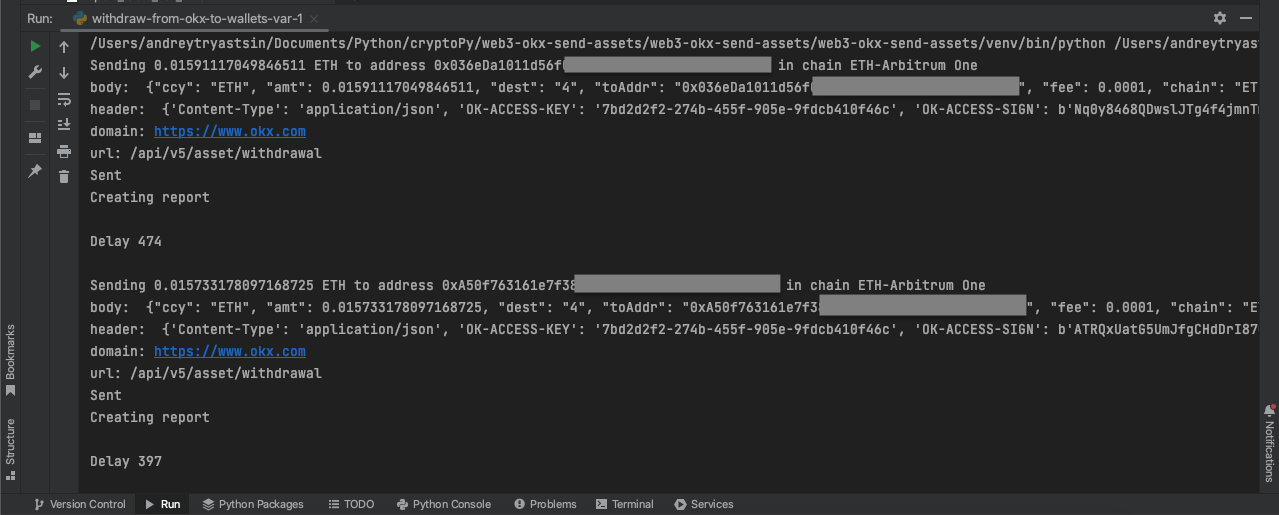
        print(f'Sending {sending_amount} {ASSET_NAME} to address {address} in chain {CHAIN_NAME}')


        api_response = fundingAPI.withdrawal(

            ccy=ASSET_NAME,

            toAddr=address,

            amt=sending_amount,

            fee=FEE,

            dest="4",

            chain=CHAIN_NAME

        )


        if api_response['code'] == '0':

            print('Sent')

            print('Creating report', '\n')

            report_table = open_table()

            create_report(report_table, address, ASSET_NAME, CHAIN_NAME, sending_amount, '-')


        elif api_response['code'] != '0':

            print('Didnt send')

            print('Creating report', '\n')

            error_code = api_response['code']

            error_message = api_response['msg']

            error_report_string = f'{error_code}-{error_message}'


            report_table = open_table()

            create_report(report_table, address, ASSET_NAME, CHAIN_NAME, sending_amount, error_report_string)


        time_sleep_value = random.choice(range(MIN_TIMESLEEP_BETWEEN_TRANSACTIONS,

                                               MAX_TIMESLEEP_BETWEEN_TRANSACTIONS))

        print('Delay', time_sleep_value, '\n')


        time.sleep(time_sleep_value)


    except Exception as error:

        print('Didnt send')

        print('Creating report', '\n')

        report_table = open_table()

        create_report(report_table, '-', '-', '-', '-', error)
Option 2 - customized send: different coins in different amounts to wallets
Required libraries
import random

import time


import pandas as pd


import okx.Funding as Funding
Settings
API_KEY = '8gb2d2f2-274b-455d-967e-9fdcb490f46c'

SECRET_KEY = 'D27A0AA2C55BC18B15055580921E56209'

PASSPHRASE = 'secret_phrase'
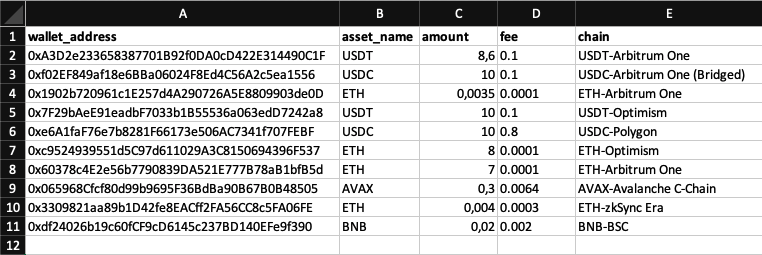
SETTINGS_XLSX = 'sending_settings_var_2.xlsx'
-
wallet_address - wallet address
-
asset_name - coin ticker
-
amount - amount to be sent
-
fee - transaction fee
-
chain - network name
SETTINGS_TXT = 'sending_settings_var_2.txt'
Additional Settings
MIN_TIMESLEEP_BETWEEN_TRANSACTIONS = 240
MAX_TIMESLEEP_BETWEEN_TRANSACTIONS = 480
REPORT_NAME = 'report_table_var_2.xlsx'
Functions for creating report
The same functions for creating a report as those used in the first example of the script.
excel_export function records data in an Excel file and takes a data table (DataFrame) and the desired report name as inputs:
def excel_export(table, table_name):

    writer_kernel = pd.ExcelWriter(table_name, engine='xlsxwriter')

    table.to_excel(writer_kernel, index=False)

    writer_kernel.close()
def open_table():

    try:

        table = pd.read_excel(REPORT_NAME)


        return table.to_dict('records')


    except:

        table_template = pd.DataFrame(index=[0])

        excel_export(table_template, REPORT_NAME)

        created_table = pd.read_excel(REPORT_NAME)


        return created_table.to_dict('records')
def create_report(report_table, address, asset_name, chain, sent_amount, error):

    report_dict = dict()

    report_dict['address'] = address

    report_dict['asset_name'] = asset_name

    report_dict['chain'] = chain

    report_dict['sent_amount'] = sent_amount

    report_dict['error'] = error


    report_table.append(report_dict)


    result_table = pd.DataFrame.from_dict(report_table)


    result_table.dropna(inplace=True)


    excel_export(result_table, REPORT_NAME)
File settings loading
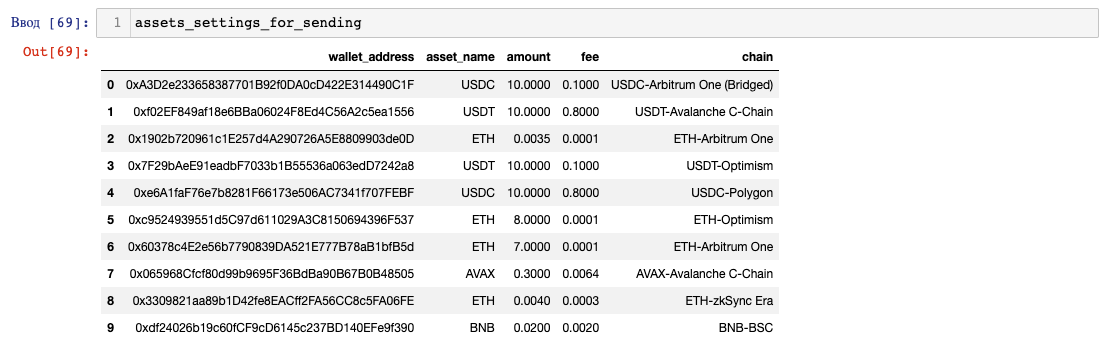
assets_settings_for_sending = pd.read_excel(SETTINGS_XLSX)
list_of_assets_settings_for_sending = assets_settings_for_sending.to_dict('records')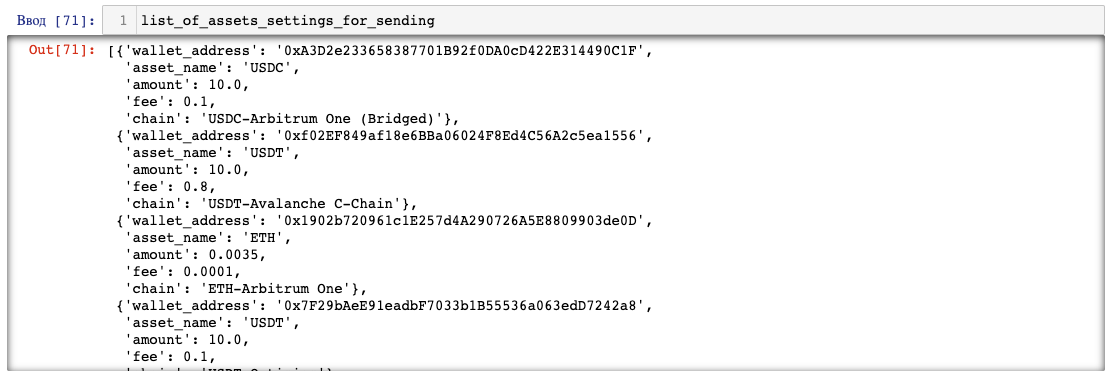
with open(SETTINGS_TXT, 'r') as file:

    lines = file.readlines()


list_of_assets_settings_for_sending = []

for line in lines:

    elements = line.strip().split(';')


    wallet_address, asset_name, amount, fee, chain_name = elements[0].split(',')

    data = {

        'wallet_address': wallet_address,

        'asset_name': asset_name,

        'amount': amount,

        'fee': fee,

        'chain_name': chain_name

    }


    list_of_assets_settings_for_sending.append(data)
Sending
fundingAPI = Funding.FundingAPI(API_KEY, SECRET_KEY, PASSPHRASE, False, '0')
-
ccy - coin name
-
toAddr - wallet address
-
amt - amount of coins
-
fee - transaction fee
-
dest - internal transfers or on-chain sending. We need "on-chain," which corresponds to parameter 4
-
chain - network name
-
On each iteration of the loop, a row is taken from the list of dictionaries list_of_assets_settings_for_sending, and the parameters are determined and assigned to their corresponding variables: wallet_address, asset_name, amount, fee, and chain.
-
The fundingAPI.withdrawal function is used to execute a transaction, and the response is stored in api_response.
-
If the 'code' in the response equals 0, the transaction was successful, and a report is recorded in the XLSX file. If the 'code' is not equal to zero, an error occurred during the transaction. In this case, all data, error code, and error description are recorded in the report XLSX.
-
The script then sleeps for a specified period of time within a range.
-
If an error occurs within the loop, the except block is executed, and a report with the error is recorded.
for row in list_of_assets_settings_for_sending:

    try:

        wallet_address, asset_name, amount, fee, chain = (row['wallet_address'], row['asset_name'],

                                                          row['amount'], row['fee'], row['chain'])


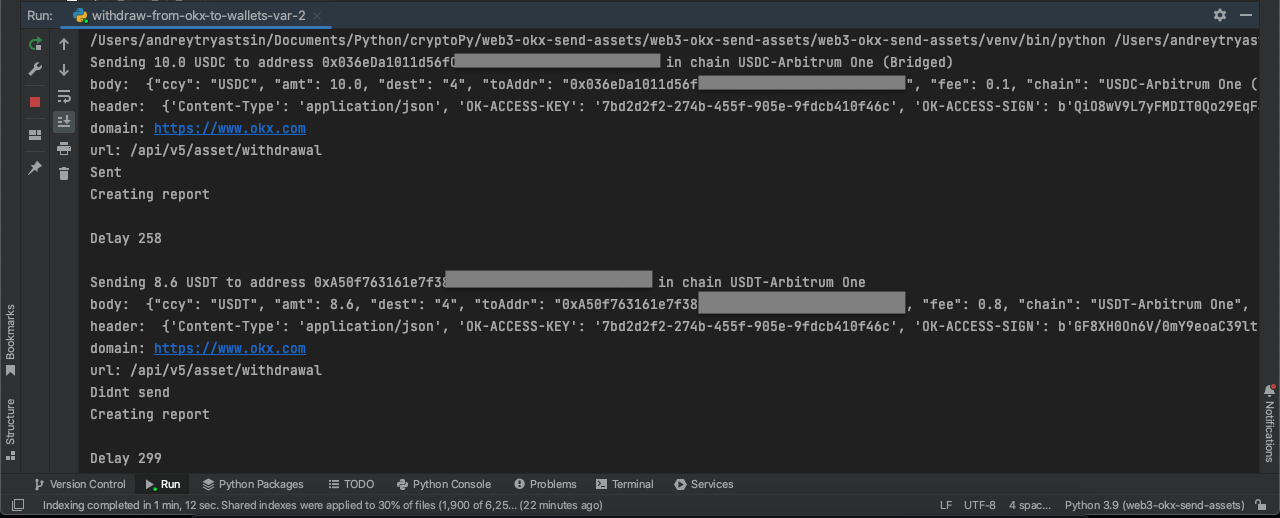
        print(f'Sending {amount} {asset_name} to address {wallet_address} in chain {chain}')


        api_response = fundingAPI.withdrawal(

            ccy=asset_name,

            toAddr=wallet_address,

            amt=amount - fee,

            fee=fee,

            dest="4",

            chain=chain

        )


        if api_response['code'] == '0':

            print('Sent')

            print('Creating report', '\n')

            report_table = open_table()

            create_report(report_table, wallet_address, asset_name, chain, amount, '-')


        elif api_response['code'] != '0':

            print('Didnt send')

            print('Creating report', '\n')

            error_code = api_response['code']

            error_message = api_response['msg']

            error_report_string = f'{error_code}-{error_message}'


            report_table = open_table()

            create_report(report_table, wallet_address, asset_name, chain, amount, error_report_string)


        time_sleep_value = random.choice(range(MIN_TIMESLEEP_BETWEEN_TRANSACTIONS,

                                               MAX_TIMESLEEP_BETWEEN_TRANSACTIONS))

        print('Delay', time_sleep_value, '\n')


        time.sleep(time_sleep_value)


    except Exception as error:

        print('Didnt send')

        print('Creating report', '\n')

        report_table = open_table()

        create_report(report_table, '-', '-', '-', '-', error)
Part 2 - sending crypto from wallets to OKX sub-accounts
To avoid creating a connection between wallets, it is advisable to send cryptocurrency to sub-accounts. Each wallet corresponds to an address on a sub-account.
I couldn't find an API method in the documentation to obtain deposit addresses for sub-accounts. Therefore, it will be necessary to obtain these addresses through the exchange's interface.
The code was taken from an excellent article at https://habr.com/ru/articles/674204/.
Option 1 - sending native coins
-
private key of the wallet
-
okx address
-
coin name
-
network name
-
amount of coins to send
-
rpc network url, which can be obtained from https://chainlist.org/
Required libraries
import random

import time


from web3 import Web3


import pandas as pd
Settings
SETTINGS_XLSX = 'sending_from_wallets_settings_var_1.xlsx'
SETTINGS_TXT = 'sending_from_wallets_settings_var_1.txt'
Additional Settings
MIN_TIMESLEEP_BETWEEN_TRANSACTIONS = 240
MAX_TIMESLEEP_BETWEEN_TRANSACTIONS = 480
REPORT_NAME = 'report_table_var_sending_from_wallets_1.xlsx'
Functions for creating report
The same functions for creating a report as those used in the first example of the script.
excel_export function records data in an Excel file and takes a data table (DataFrame) and the desired report name as inputs:
def excel_export(table, table_name):

    writer_kernel = pd.ExcelWriter(table_name, engine='xlsxwriter')

    table.to_excel(writer_kernel, index=False)

    writer_kernel.close()
def open_table():

    try:

        table = pd.read_excel(REPORT_NAME)


        return table.to_dict('records')


    except:


        table_template = pd.DataFrame(index=[0])


        excel_export(table_template, REPORT_NAME)


        created_table = pd.read_excel(REPORT_NAME)


        return created_table.to_dict('records')
def create_report(report_table, wallet_address, okx_address, asset_name, chain, sent_amount, txn_hash, error):


    report_dict = dict()

    report_dict['wallet_address'] = wallet_address

    report_dict['okx_address'] = okx_address

    report_dict['asset_name'] = asset_name

    report_dict['chain'] = chain

    report_dict['sent_amount'] = sent_amount

    report_dict['txn_hash'] = txn_hash

    report_dict['error'] = error


    report_table.append(report_dict)


    result_table = pd.DataFrame.from_dict(report_table)


    result_table.dropna(inplace=True)


    excel_export(result_table, REPORT_NAME)
File settings loading
settings_for_sending_from_wallets = pd.read_excel(SETTINGS_XLSX)
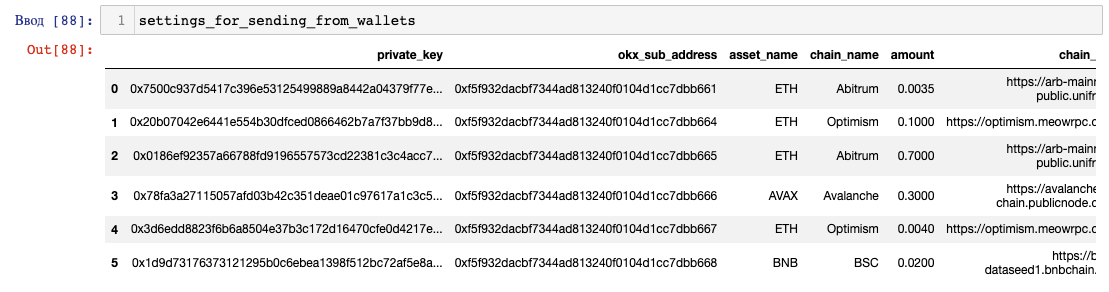
list_of_settings_for_sending_from_wallets = settings_for_sending_from_wallets.to_dict('records')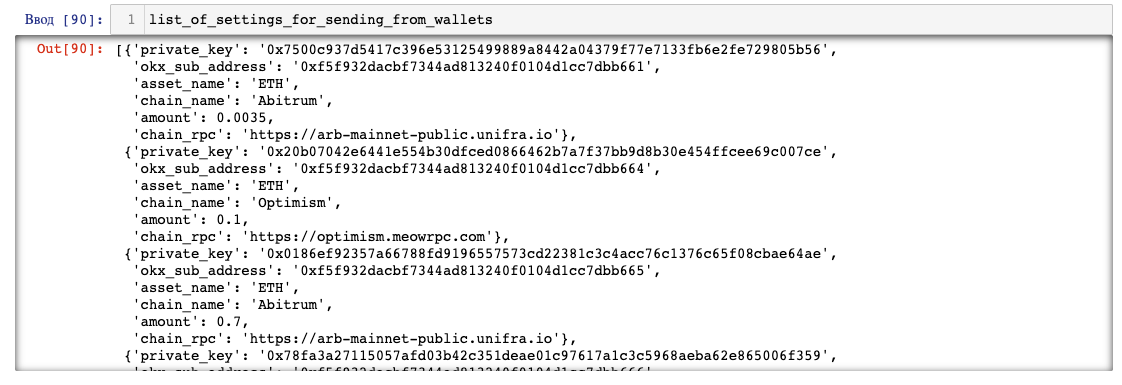
with open(SETTINGS_TXT, 'r') as file:

    lines = file.readlines()


list_of_assets_settings_for_sending = []

for line in lines:

    elements = line.strip().split(';')


    private_key, okx_sub_address, asset_name, chain_name, amount, chain_rpc = elements[0].split(',')

    data = {

        'private_key': private_key,

        'okx_sub_address': okx_sub_address,

        'asset_name': asset_name,

        'chain_name': chain_name,

        'amount': amount,

        'chain_rpc': chain_rpc

    }


    list_of_assets_settings_for_sending.append(data)
Sending
-
On each iteration of the loop, all the parameters for the transaction are determined from the configuration file. The script establishes a connection via the RPC URL provided in the settings.
-
The script establishes a connection via the RPC URL provided in the settings.
-
From the private key specified in the settings, the script derives the public address.
-
The amount_wei variable converts the amount of coins from Wei to Ether, as specified in the settings.
-
gas_price determines the gas price, estimated_gas estimates the gas limit for the cryptocurrency transfer, and fee calculates the transaction fee cost.
-
nonce determines the transaction number.
-
In the transaction_settings, all the parameters for the upcoming transaction are set. Value is calculated from the sent amount minus the fee.
-
The sent_amount is converted from Wei to Ether for reporting.
-
The transaction is signed, using the private key, and sent via send_raw_transaction. The transaction_hash is recorded.
-
Report is created.
-
time_sleep_value determines a random delay time. The script sleeps.
-
If an error occurs and the except block is triggered, the transaction data and error are recorded.
for row in list_of_settings_for_sending_from_wallets:

    try:

        private_key, okx_sub_address, asset_name, chain_name, amount, chain_rpc = (row['private_key'],

                                                                                  row['okx_sub_address'],

                                                                                  row['asset_name'],

                                                                                  row['chain_name'],

                                                                                  row['amount'],

                                                                                  row['chain_rpc'])


        web3 = Web3(Web3.HTTPProvider(chain_rpc))


        from_address = web3.eth.account.from_key(private_key).address


        print(f'Sending {amount} {asset_name} on the {chain_name} network from address {from_address}')


        to_address = web3.to_checksum_address(okx_sub_address)


        print(f'To OKX address {to_address}')


        amount_wei = int(web3.to_wei(amount, 'ether'))


        gas_price = web3.eth.gas_price


        estimated_gas = web3.eth.estimate_gas({

            'to': to_address,

            'value': amount_wei,

        })


        fee = gas_price * estimated_gas


        nonce = web3.eth.get_transaction_count(from_address)


        transaction_settings = {

          'chainId': web3.eth.chain_id,

          'from': from_address,

          'to': to_address,

          'value': amount_wei - fee,

          'nonce': nonce,

          'gasPrice': gas_price,

          'gas': estimated_gas,

        }


        sent_amount = float(web3.from_wei(amount_wei - fee, 'ether'))


        signed_transaction = web3.eth.account.sign_transaction(transaction_settings, private_key)


        transaction_hash = web3.eth.send_raw_transaction(signed_transaction.rawTransaction)


        print('Sent')

        print('Txn hash:', transaction_hash.hex())


        print('Creating report')

        report_table = open_table()

        create_report(report_table, from_address, to_address,

                      asset_name, chain_name, sent_amount, transaction_hash.hex(), '-')


        time_sleep_value = random.choice(range(MIN_TIMESLEEP_BETWEEN_TRANSACTIONS,

                                               MAX_TIMESLEEP_BETWEEN_TRANSACTIONS))

        print('Delay', time_sleep_value, '\n')


        time.sleep(time_sleep_value)


    except Exception as error:

        print('Didnt send')

        print('Creating report')

        report_table = open_table()

        create_report(report_table, from_address, to_address,

                      asset_name, chain_name, '-', '-', error)

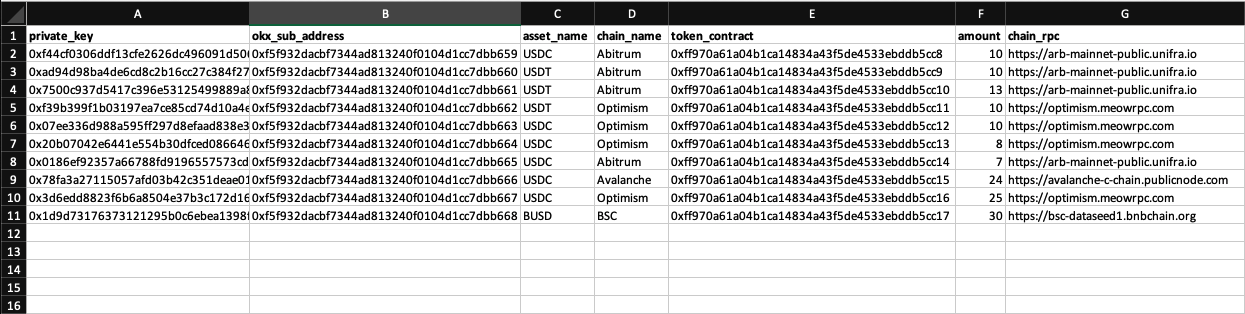
Option 2 - sending tokens, such as stablecoins
-
private key of the wallet
-
okx address
-
coin name
-
network name
-
smart-contract address
-
amount of coins to send
-
rpc network url, which can be obtained from https://chainlist.org/
Required libraries
import random

import json

import time


from web3 import Web3

import pandas as pd
Settings
JSON_NAME = 'ERC20_ABI.json'
SETTINGS_XLSX = 'sending_from_wallets_settings_var_2.xlsx'
SETTINGS_TXT = 'sending_from_wallets_settings_var_2.txt'
Additional Settings
MIN_TIMESLEEP_BETWEEN_TRANSACTIONS = 240
MAX_TIMESLEEP_BETWEEN_TRANSACTIONS = 480
REPORT_NAME = 'report_table_var_sending_from_wallets_2.xlsx'
Functions for creating report
The same functions for creating a report as those used in the first example of the script.
excel_export function records data in an Excel file and takes a data table (DataFrame) and the desired report name as inputs:
def excel_export(table, table_name):

    writer_kernel = pd.ExcelWriter(table_name, engine='xlsxwriter')

    table.to_excel(writer_kernel, index=False)

    writer_kernel.close()
def open_table():

    try:

        table = pd.read_excel(REPORT_NAME)


        return table.to_dict('records')


    except:


        table_template = pd.DataFrame(index=[0])


        excel_export(table_template, REPORT_NAME)


        created_table = pd.read_excel(REPORT_NAME)


        return created_table.to_dict('records')
def create_report(report_table, wallet_address, okx_address, asset_name, chain, sent_amount, txn_hash, error):


    report_dict = dict()

    report_dict['wallet_address'] = wallet_address

    report_dict['okx_address'] = okx_address

    report_dict['asset_name'] = asset_name

    report_dict['chain'] = chain

    report_dict['sent_amount'] = sent_amount

    report_dict['txn_hash'] = txn_hash

    report_dict['error'] = error


    report_table.append(report_dict)


    result_table = pd.DataFrame.from_dict(report_table)


    result_table.dropna(inplace=True)


    excel_export(result_table, REPORT_NAME)
File settings loading
settings_for_sending_from_wallets = pd.read_excel(SETTINGS_XLSX)

list_of_settings_for_sending_from_wallets = settings_for_sending_from_wallets.to_dict('records')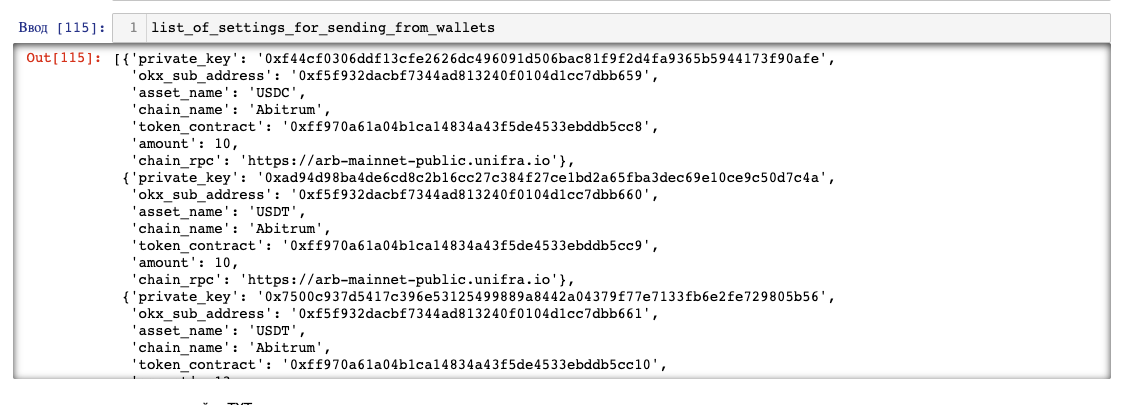
with open(SETTINGS_TXT, 'r') as file:

    lines = file.readlines()


list_of_assets_settings_for_sending = []

for line in lines:

    elements = line.strip().split(';')


    private_key, okx_sub_address, asset_name, chain_name, token_contract, amount, chain_rpc = elements[0].split(',')

    data = {

        'private_key': private_key,

        'okx_sub_address': okx_sub_address,

        'asset_name': asset_name,

        'chain_name': chain_name,

        'token_contract': token_contract,

        'amount': amount,

        'chain_rpc': chain_rpc

    }


    list_of_assets_settings_for_sending.append(data)
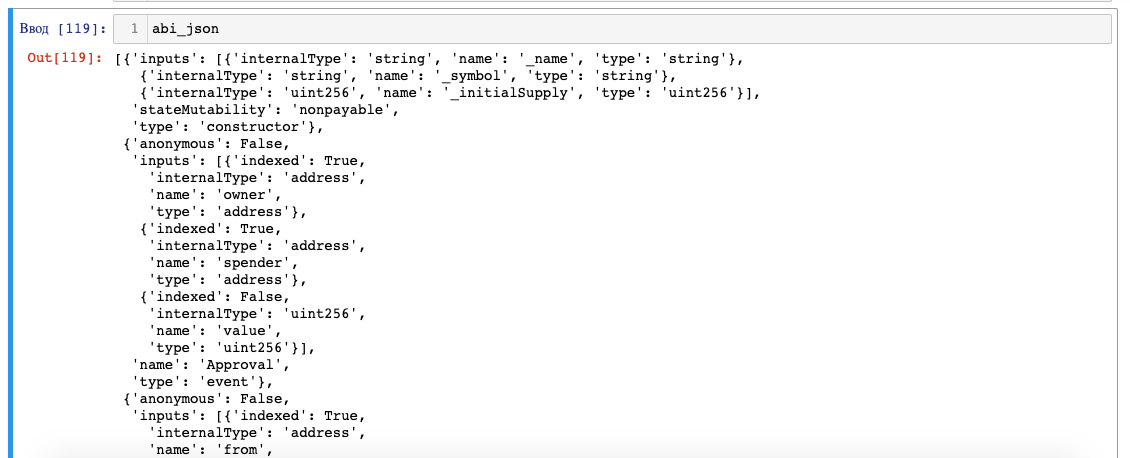
with open(JSON_NAME, 'r') as file:

    abi_json = json.load(file)
Sending
-
On each iteration of the loop, all the transaction parameters are determined from the settings file.
-
A connection is established using the RPC URL specified in the settings.
-
The public address is derived from the private key provided in the settings.
-
The specified contract is initialized in the token_contract.
-
The token_decimals variable is used to determine the number of decimal places for the token, which is the format it is stored in within a given network.
-
The sending_amount records the quantity of tokens to be sent in the appropriate format.
-
All the parameters for the future transaction are set in transaction_settings.
-
transaction is created in the transaction variable.
-
The transaction is signed in signed_transaction using the private key.
-
The signed transaction is then sent using send_raw_transaction, and the transaction_hash is recorded.
-
The sent_amount is converted from wei to ether for reporting purposes.
-
Report is generated.
-
random delay time is determined in time_sleep_value. The script sleeps.
-
If except is triggered, transaction data and the error are recorded.
for row in list_of_settings_for_sending_from_wallets:

    try:

        private_key, okx_sub_address, asset_name, chain_name, contract, amount, chain_rpc = (row['private_key'],

                                                                                            row['okx_sub_address'],

                                                                                            row['asset_name'],

                                                                                            row['chain_name'],

                                                                                            row['token_contract'],

                                                                                            row['amount'],

                                                                                            row['chain_rpc'])

        web3 = Web3(Web3.HTTPProvider(chain_rpc))


        from_address = web3.eth.account.from_key(private_key).address


        print(f'Sending {amount} {asset_name} on the {chain_name} network from address {from_address}')


        to_address = web3.to_checksum_address(okx_sub_address)


        print(f'To OKX address {to_address}')


        token_contract = web3.eth.contract(web3.to_checksum_address(contract), abi=abi_json)


        token_decimals = token_contract.functions.decimals().call()


        sending_amount = int(amount * 10**token_decimals)


        transaction_settings = {

            'chainId': web3.eth.chain_id,

            'from': from_address,

            'gasPrice': web3.eth.gas_price,

            'nonce': web3.eth.get_transaction_count(from_address)

        }


        transaction = token_contract.functions.transfer(to_address,

                                                         sending_amount).build_transaction(transaction_settings)


        signed_transaction = web3.eth.account.sign_transaction(transaction, private_key)


        transaction_hash = web3.eth.send_raw_transaction(signed_transaction.rawTransaction)


        sent_amount = float(web3.from_wei(sending_amount, 'ether'))


        print('Sent')

        print('Txn hash:', transaction_hash.hex())


        print('Creating report')

        report_table = open_table()

        create_report(report_table, from_address, to_address,

                      asset_name, chain_name, sent_amount, transaction_hash.hex(), '-')


        time_sleep_value = random.choice(range(MIN_TIMESLEEP_BETWEEN_TRANSACTIONS,

                                               MAX_TIMESLEEP_BETWEEN_TRANSACTIONS))

        print('Delay', time_sleep_value, '\n')


        time.sleep(time_sleep_value)


    except Exception as error:

        print('Didnt send')

        print('Creating report', '\n')

        print(error, '\n')

        report_table = open_table()

        create_report(report_table, from_address, to_address,

                      asset_name, chain_name, '-', '-', error)