Creating EVM wallets using the Web3 library in Python
Contents:
How to use code from the article
Instructions on how to run .py and .ipynb files are provided in the guide.
Download the repository from GitHub. In it, you will find:
-
.py files - 3 wallet creation options
-
create-evm-wallets-var-1.py
-
create-evm-wallets-var-2.py
-
create-evm-wallets-var-3.py
-
Excel tables and TXT files that are generated as a result of running each script. Provided as examples.
-
The "create-evm-wallets.ipynb" file contains all the code (all options) in Jupyter Notebook format.
Option 1 - Generating private keys
create-evm-wallets-var-1.py. In this option, public addresses and private keys will be generated for each account.
Library Imports
from web3 import Web3

import pandas as pd
How many accounts to generate
ACCOUNTS_QUANTITY = 10
Connection
connection = Web3()
Creating accounts, recording public addresses, and private keys in Excel or TXT
Within a loop, an account is created with connection.eth.account.create() and stored in the 'account' variable. During each iteration, a dictionary with a public address 'address' and a private key 'private_key' is created, and the dictionary is added to the list 'list_of_dicts'.
list_of_dicts = []

for number in range(ACCOUNTS_QUANTITY):

    account = connection.eth.account.create()

    address = account.address

    private_key = account.key.hex()


    print('Account', number+1, '\n',

          'Public:', address, '\n',

          'Private_key:', private_key, '\n',

          '--------------------------')


    dictionary = dict()

    dictionary['address'] = address

    dictionary['private_key'] = private_key


    list_of_dicts.append(dictionary)
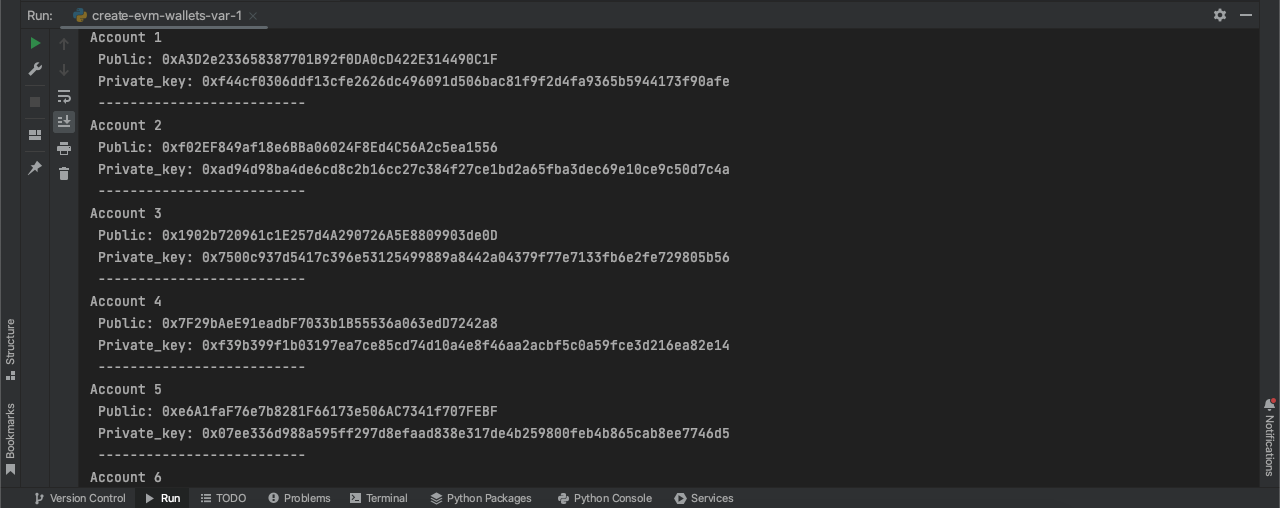
The process is displayed in the terminal:
Writing to Excel
DataFrame is created from the 'list_of_dicts' list:
df = pd.DataFrame.from_dict(list_of_dicts)
Exporting the DataFrame to Excel::
writer_kernel = pd.ExcelWriter('ready_evm_accounts_var_1.xlsx', engine='xlsxwriter')

df.to_excel(writer_kernel, index=False)

writer_kernel.close()
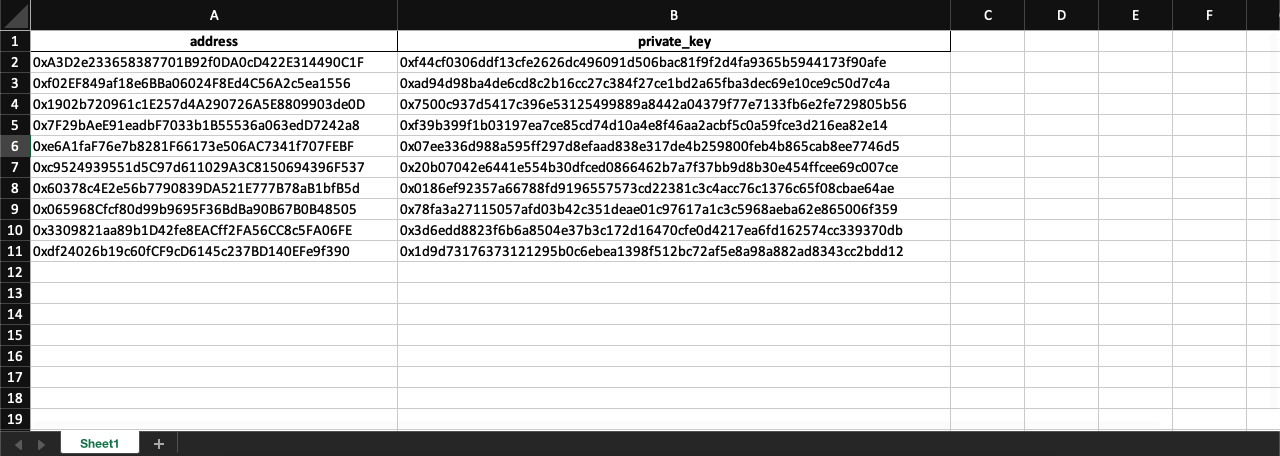
The result obtained in Excel:
Writing to TXT
The address and private key are recorded with a comma on a new line:
with open('ready_evm_accounts_var_1.txt', 'w') as file:

    for d in list_of_dicts:

        file.write(f"{d['address']},{d['private_key']}\n")
The result obtained in TXT:

Option 2 - Generating seed phrases, private keys, and public addresses
create-evm-wallets-var-2.py. In this option, seed phrases, public addresses, and private keys will be generated for each account.
Library Imports
from web3 import Web3

import pandas as pd
How many accounts to generate
ACCOUNTS_QUANTITY = 10
Connection
connection = Web3()
Creating accounts, recording seed phrases, public addresses, and private keys in Excel or TXT
connection.eth.account.enable_unaudited_hdwallet_features()
list_of_dicts = []

for number in range(ACCOUNTS_QUANTITY):

    account = connection.eth.account.create_with_mnemonic()

    seed_phrase = account[1]

    address = account[0].address

    private_key = account[0].key.hex()


    print('Account', number+1, '\n',

          'Seed:', seed_phrase, '\n',

          'Public:', address, '\n',

          'Private_key:', private_key, '\n',

          '--------------------------')


    dictionary = dict()

    dictionary['seed_phrase'] = seed_phrase

    dictionary['address'] = address

    dictionary['private_key'] = private_key


    list_of_dicts.append(dictionary)
Process in the terminal:

Writing to Excel
DataFrame is created from the 'list_of_dicts' list:
df = pd.DataFrame.from_dict(list_of_dicts)
Exporting the DataFrame to Excel:
writer_kernel = pd.ExcelWriter('ready_evm_accounts_var_2.xlsx', engine='xlsxwriter')

df.to_excel(writer_kernel, index=False)

writer_kernel.close()
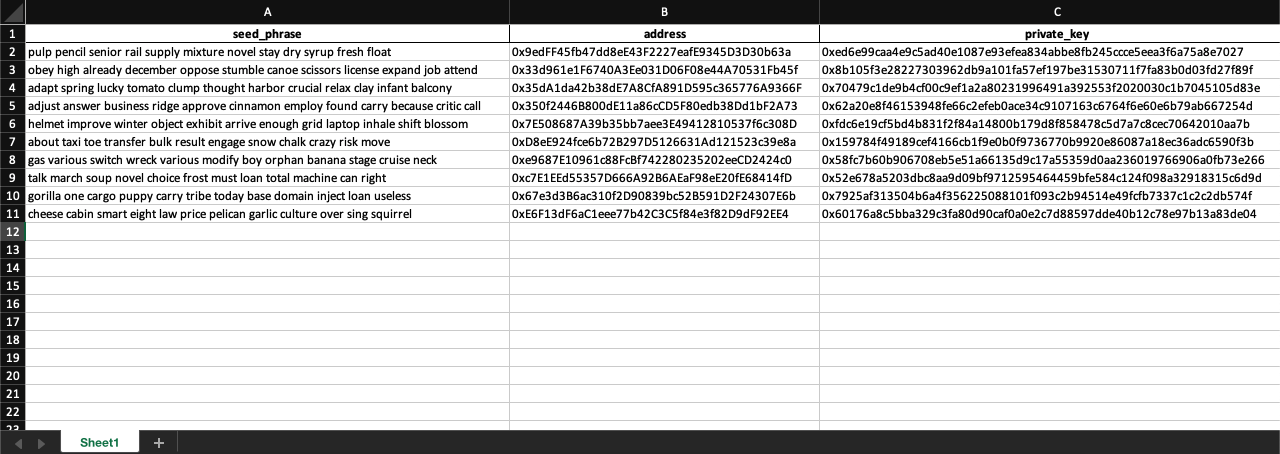
The result obtained in Excel:
Writing to TXT
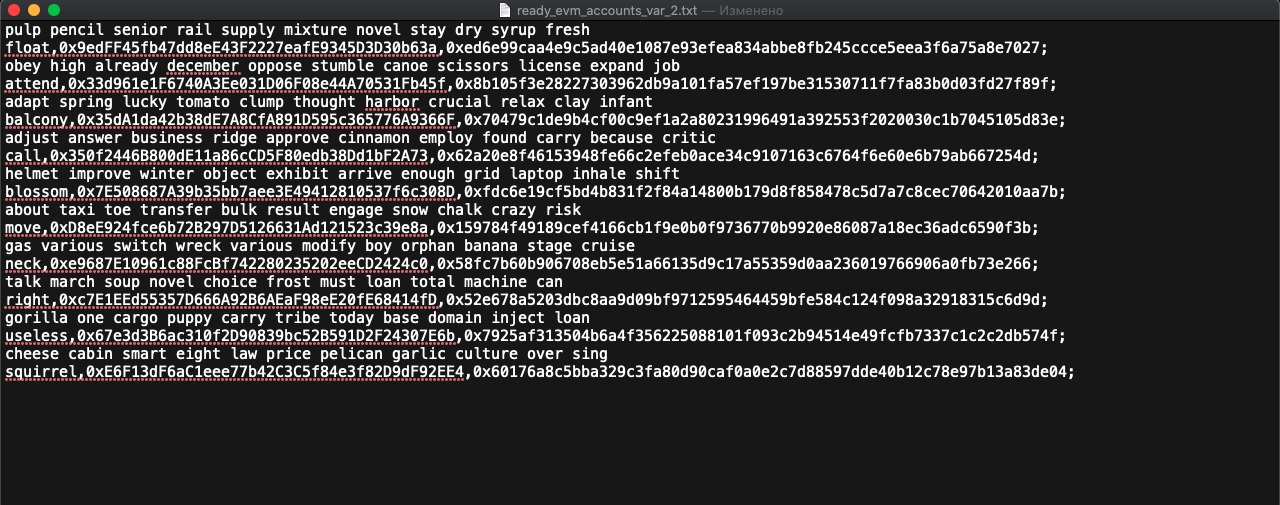
The seed phrase, address, and private key are recorded with commas, and each block is separated by a semicolon:
with open('ready_evm_accounts_var_2.txt', 'w') as file:

    for d in list_of_dicts:

        file.write(f"{d['seed_phrase']},{d['address']},{d['private_key']};\n")
The result obtained in TXT:
Option 3 - Generating multiple addresses and private keys from a single seed phrase
create-evm-wallets-var-3.py. In this option, one seed phrase is created, and public addresses and private keys are generated from it.
How many accounts to generate
from web3 import Web3

import pandas as pd
How many accounts to generate
ACCOUNTS_QUANTITY = 10
Connection
connection = Web3()
Creating accounts, recording seed phrase, public addresses, and private keys in Excel or TXT
connection.eth.account.enable_unaudited_hdwallet_features()
Generating a seed phrase:
mnemonic = connection.eth.account.create_with_mnemonic()[1]
Generating wallets from the seed phrase:
list_of_dicts = []

for number in range(ACCOUNTS_QUANTITY):

    account = connection.eth.account.from_mnemonic(mnemonic,

                                                   account_path=f"m/44'/60'/0'/0/{number}")

    address = account.address

    private_key = account.key.hex()


    print('Account', number+1, '\n',

          'Public:', address, '\n',

          'Private_key:', private_key, '\n',

          '--------------------------')


    dictionary = dict()

    dictionary['address'] = address

    dictionary['private_key'] = private_key


    list_of_dicts.append(dictionary)
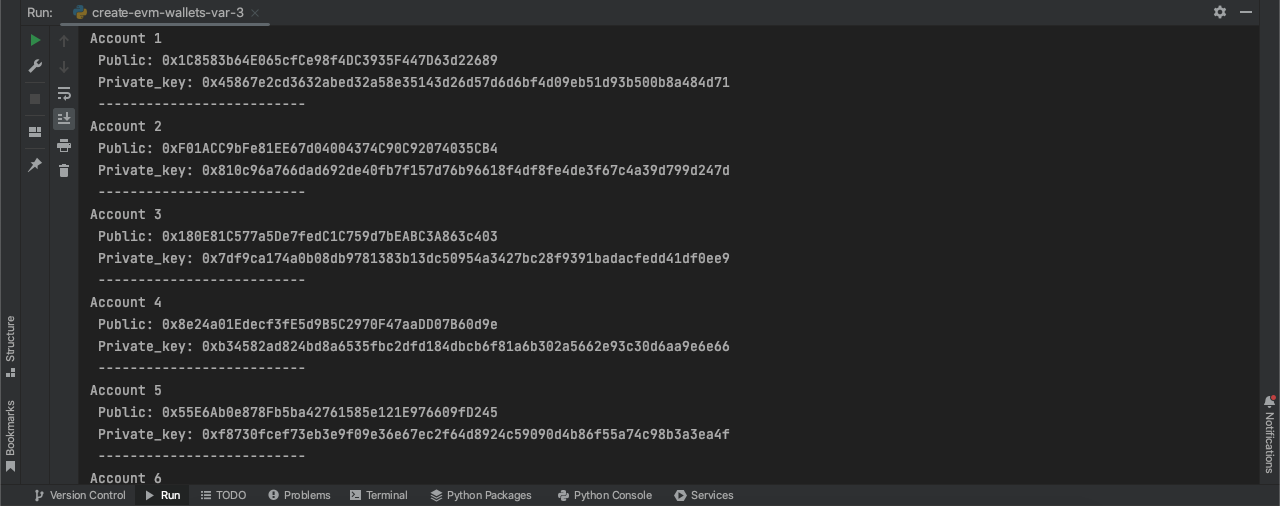
Process in the terminal:
Writing to Excel
DataFrame is created from the 'list_of_dicts' list:
df = pd.DataFrame.from_dict(list_of_dicts)
Exporting the DataFrame to Excel:
writer_kernel = pd.ExcelWriter('ready_evm_accounts_var_3.xlsx', engine='xlsxwriter')

df.to_excel(writer_kernel, index=False)

writer_kernel.close()
Writing to TXT
The address and private key are recorded with a comma, and each block is separated by a semicolon:
with open('ready_evm_accounts_var_3.txt', 'w') as file:

    for d in list_of_dicts:

        file.write(f"{d['address']},{d['private_key']};\n")
Another option for exporting accounts with a single seed phrase
Запись в Excel
DataFrame is created from the 'list_of_dicts' list:
df = pd.DataFrame.from_dict(list_of_dicts)
An additional column is added in which the common seed phrase for all accounts is recorded:
df['seed'] = mnemonic
A grouping is created:
pivot_df = df.pivot_table(index=['seed', 'address', 'private_key'])
Exporting the DataFrame to Excel:
writer_kernel = pd.ExcelWriter('ready_evm_accounts_var_3_global_seed.xlsx', engine='xlsxwriter')

pivot_df.to_excel(writer_kernel)

writer_kernel.close()
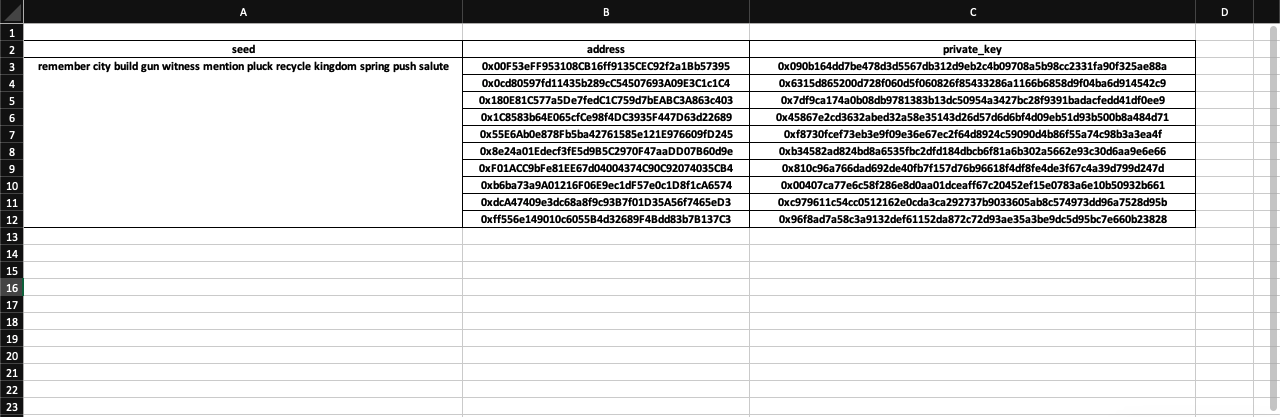
The result obtained in Excel:
Writing to TXT
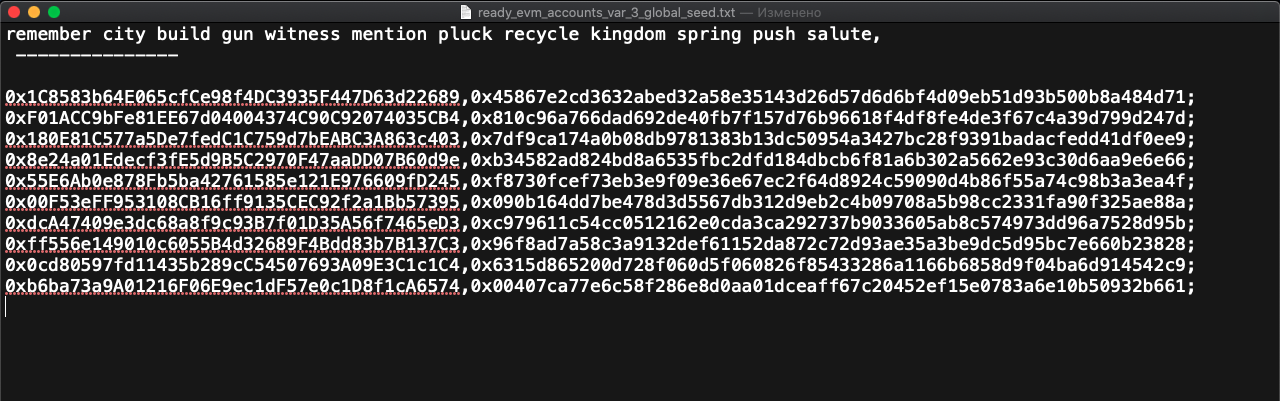
The seed phrase is recorded, separated by a line. The address and private key are recorded with a comma, and each block is separated by a semicolon:
with open('ready_evm_accounts_var_3_global_seed.txt', 'w') as file:

    file.write(f'{mnemonic}, \n --------------- \n \n')

    for d in list_of_dicts:

        file.write(f"{d['address']},{d['private_key']};\n")
The result obtained in Excel: