EVM network account warmup - self-transactions and transactions to random addresses using Web3.py
Contents:
What this script does
-
txt file containing private keys of wallets for which transactions will be conducted,
-
the module chain_settings.py where settings for networks in which transactions will be performed are defined.
-
SELF: Sending transactions to one's own address,
-
RANDOM: Generating a random address and sending a certain amount of coins to it.
For each wallet in the list, a network is selected, a random number of transactions is determined, and within this quantity, the type of transaction is randomly chosen. For instance, in the BSC network, there will be 12 transactions, comprising 3 SELF transactions and 9 RANDOM transactions, and so on. After each transaction, the process sleeps for a randomly determined period.
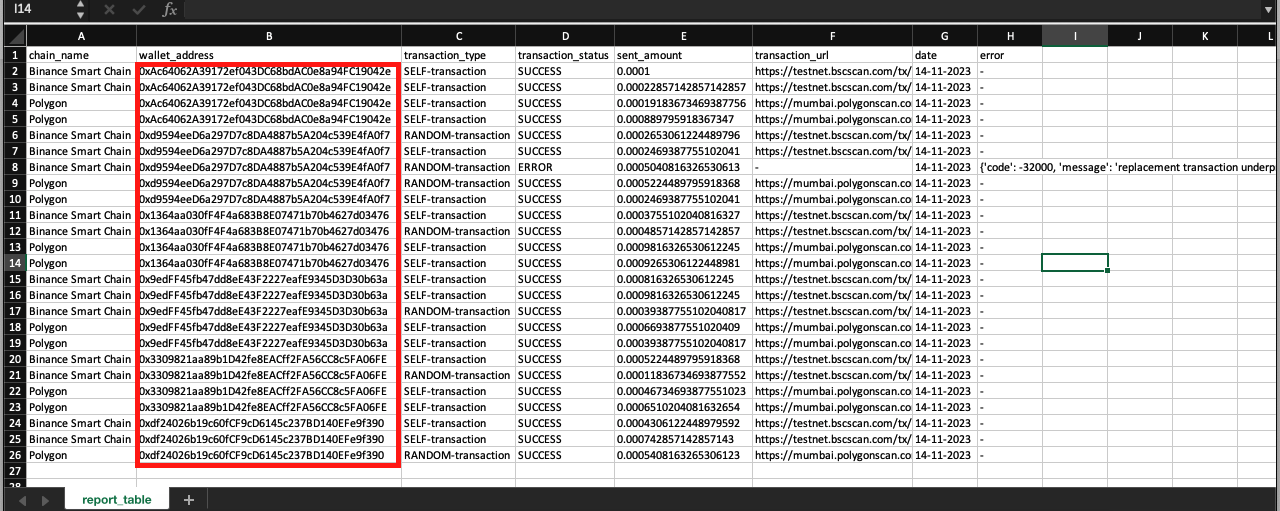
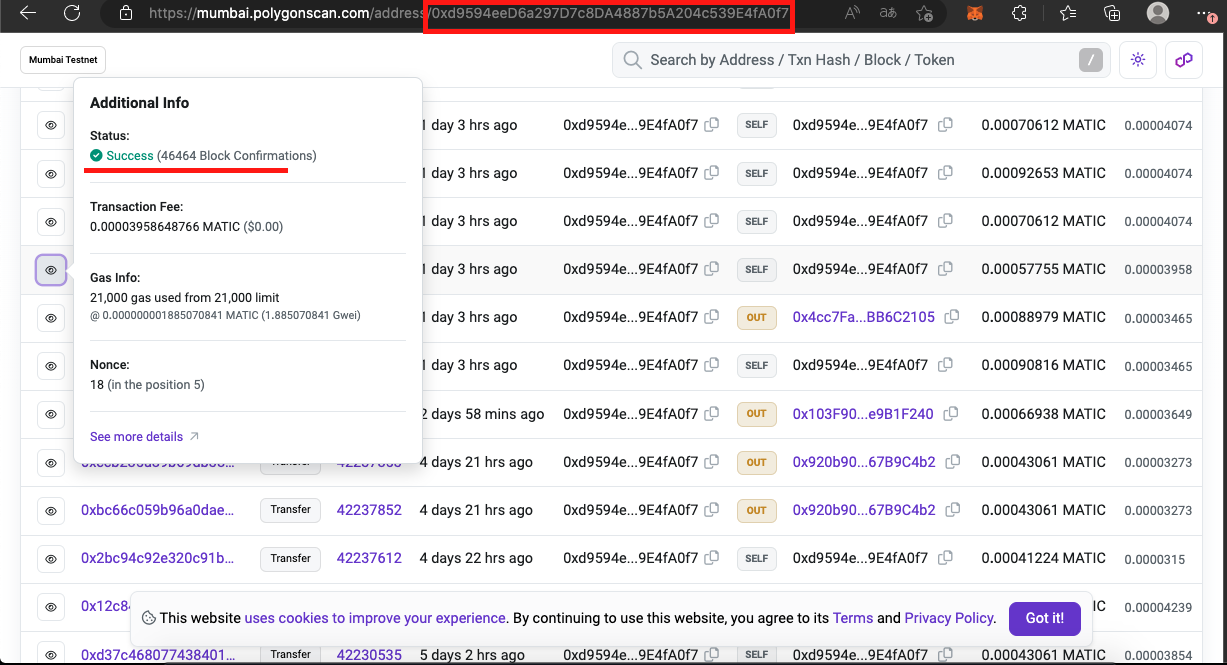
Once all transactions for all addresses are completed, a report is exported to a CSV file.
Synchronous version of the script
How to use the code from the article
How to run .py and .ipynb files is described in the instructions.
Download the repository from GitHub. Inside, you'll find:
-
chain_settings.py - a file with blockchain settings where warming up will occur,
-
config.py - a file with script settings,
-
functions.py - a module with functions,
-
main.py - the main function for execution, the entry point,
-
private_keys.txt - a text file with example private keys,
-
report_table.csv - a table with the script's work report as an example.
Module chain_settings.py
The network settings are listed in the file as dictionaries, outlining where transactions will occur.
Network settings:
-
name - name of the network used for console output and reporting
-
url - used for connection
-
min_amount_for_sending - minimum amount for sending
-
max_amount_for_sending - maximum amount for sending
-
min_transactions - minimum number of transactions to be made on the network
-
max_transactions - maximum number of transactions to be made on the network
-
explorer_url - URL of the explorer where the transaction hash will be inserted
Examples of settings
polygon = {

            'name': 'Polygon',

            'url':'https://polygon.llamarpc.com',

            'min_amount_for_sending':0.0001,

            'max_amount_for_sending':0.001,

            'min_transactions':5,

            'max_transactions':10,

            'explorer_url':'https://polygonscan.com/tx/'

            }
bsc = {
'name': 'Binance Smart Chain',
'url':'https://bsc.publicnode.com',
'min_amount_for_sending':0.0001,
'max_amount_for_sending':0.001,
'min_transactions':12,
'max_transactions':24,
'explorer_url':'https://bscscan.com/tx/'
}avalanche = {
'name': 'Avalanche',
'url':'https://avalanche-c-chain.publicnode.com',
'min_amount_for_sending':0.0001,
'max_amount_for_sending':0.001,
'min_transactions':5,
'max_transactions':10,
'explorer_url':'https://snowtrace.io/tx/'
}__all__ = ['polygon', 'bsc', 'avalanche']
Config.py
TXT_WITH_PRIVATE_KEYS = 'private_keys.txt'
REPORT_TABLE_NAME = 'report_table.csv'
NUMBER_OF_VARIATION_BETWEEN_VALUES = 50
MIN_TIMESLEEP_BETWEEN_TRANSACTIONS = 100
MAX_TIMESLEEP_BETWEEN_TRANSACTIONS = 250
Module functions.py
Libraries
import time

import random

from datetime import datetime


import numpy as np

import pandas as pd


from web3 import Web3


from config import REPORT_TABLE_NAME, NUMBER_OF_VARIATIONS_BETWEEN_SENDING_AMOUNT, MIN_TIMESLEEP_BETWEEN_TRANSACTIONS, \

    MAX_TIMESLEEP_BETWEEN_TRANSACTIONS

import chain_settings
-
time - for delays
-
random - for randomization
-
datetime - used for dates in the report
-
pandas - tool for working with tables, used for loading/creating the report table and writing data
-
numpy - used to create a range of various types of numbers, both integers and decimals
-
web3 - connection to RPC, creation, signing, and sending of transactions
-
config - variables explicitly imported from the file
-
chain_settings - module with chain settings where transactions will occur
Generating report
global_list_for_report = list()
Function for creating report
def save_report_to_global_list(chain_name, wallet_address,

                               transaction_type, transaction_status,

                               amount, transaction_explorer_url, error):

    d = dict()

    d['chain_name'] = chain_name

    d['wallet_address'] = wallet_address

    d['transaction_type'] = transaction_type

    d['transaction_status'] = transaction_status

    d['sent_amount'] = amount

    d['transaction_url'] = transaction_explorer_url

    d['date'] = datetime.now().strftime('%d-%m-%Y')

    d['error'] = error


    global global_list_for_report

    global_list_for_report.append(d)
Function to export the report to CSV
def export_report():

    global global_list_for_report

    df = pd.DataFrame.from_dict(global_list_for_report)

    df.to_csv(REPORT_TABLE_NAME, index=False)
Random selection of values
def create_random_value_from_range(min_value, max_value):

    random_value_between_range = random.choice(range(min_value, max_value))


    return random_value_between_range
Random selection of the amount of coins to send
def create_random_amount_for_sending(min_value_for_sending, max_value_for_sending,

                                     number_of_variations_between_sending_amount):

    random_position = random.choice(range(number_of_variations_between_sending_amount))


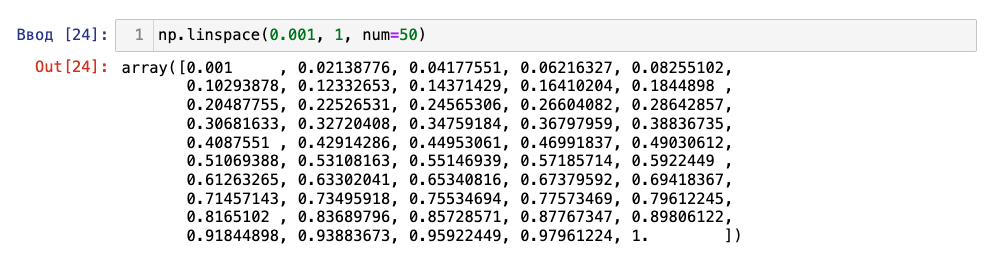
    random_amount_for_sending = np.linspace(min_value_for_sending,

                                            max_value_for_sending,

                                            num=number_of_variations_between_sending_amount)[random_position]


    return random_amount_for_sending


Transactions
Transaction setup
The amount_wei converts the sent value from ether to wei.
The gas_price determines the gas price, and estimated_gas estimates the gas limit for sending crypto.
The nonce determines the transaction number.
All parameters for the future transaction are recorded in the transaction dictionary.
The function returns "transaction" dictionary.
def transaction_settings(web3, from_address, to_address, amount):

    amount_wei = web3.to_wei(amount, 'ether')


    gas_price = web3.eth.gas_price


    estimated_gas = web3.eth.estimate_gas({

        'to': to_address,

        'value': amount_wei,

    })


    nonce = web3.eth.get_transaction_count(from_address)


    transaction = {

        'chainId': web3.eth.chain_id,

        'from': from_address,

        'to': to_address,

        'value': amount_wei,

        'nonce': nonce,

        'gasPrice': gas_price,

        'gas': estimated_gas,

    }


    return transaction
Signing and sending the transaction
The settings for the future transaction are recorded in create_transaction.
The settings and private key are passed into signed_transaction, where the transaction is signed.
The transaction hash is recorded in transaction_hash.
The function returns hash.
def create_sign_send_transaction(web3, from_address, to_address, amount, private_key):

    create_transaction = transaction_settings(

        web3=web3,

        from_address=from_address,

        to_address=to_address,

        amount=amount

    )


    signed_transaction = web3.eth.account.sign_transaction(create_transaction, private_key)


    transaction_hash = web3.eth.send_raw_transaction(signed_transaction.rawTransaction)


    return transaction_hash.hex()
SELF transaction
-
Accepts connection, amount of coins to send, private key, minimum and maximum delay between transactions, chain name, and explorer URL.
-
Before sending, a random number within a small range is generated as timesleep_value, causing the script to pause for that duration.
-
The public address, determined from the private key, is recorded in my_address.
-
In create_sign_send_transaction the sending takes place, with my_address as both the sender and recipient. The hash is recorded in transaction_hash.
-
The report is recorded in save_report_to_global_list . The function receives the network name, public address, transaction type, SUCCESS status, amount, URL obtained by substituting a parameter from chain_settings.py , and transaction hash. Since there is no error, a dash is passed.
-
A random number is generated into timesleep_value from the values passed to the function. The script sleeps.
-
If an exception block is triggered, the report records the network name, public address, transaction type, ERROR status, amount, a dash is passed instead of the URL, and the error code.
def self_transaction(web3, amount, private_key,

                     min_timesleep_between_transactions,

                     max_timesleep_between_transactions,

                     chain_name, explorer_url):


    try:

        timesleep_value = create_random_value_from_range(5, 15)

        time.sleep(timesleep_value)


        transaction_type = 'SELF-transaction'

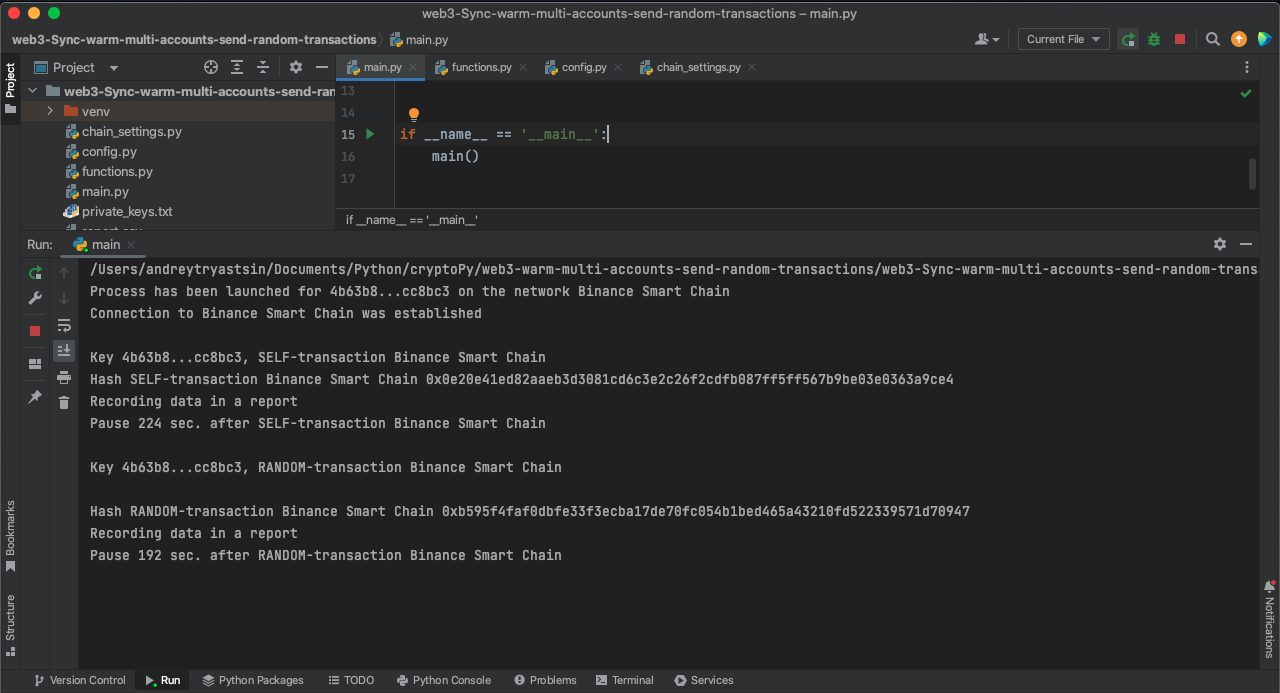
        print(f'Key {private_key[:6]}...{private_key[-6:]}, {transaction_type} {chain_name}')


        my_address = web3.eth.account.from_key(private_key).address


        transaction_hash = create_sign_send_transaction(web3, my_address, my_address,

                                                        amount, private_key)


        print(f'Hash {transaction_type} {chain_name} {transaction_hash}')


        print(f'Recording data in a report')

        save_report_to_global_list(chain_name, my_address,

                                   transaction_type, 'SUCCESS',

                                   amount, f'{explorer_url}{transaction_hash}', '-')


        timesleep_value = create_random_value_from_range(min_timesleep_between_transactions,

                                                         max_timesleep_between_transactions)

        print(f'Pause {timesleep_value} sec. after {transaction_type} {chain_name} ', '\n')

        time.sleep(timesleep_value)


    except Exception as error:

        print(f'{transaction_type} {chain_name}, error -  {error}', '\n')

        save_report_to_global_list(chain_name, my_address,

                                   transaction_type, 'ERROR',

                                   amount, '-', error)
RANDOM transaction
-
Accepts connection, amount of coins to send, private key, minimum and maximum delay between transactions, chain name, and explorer URL.
-
Before sending, a random number within a small range is generated as timesleep_value, causing the script to pause for that duration.
-
An account is created in account. The public address of the created account, where the transaction will be sent, is recorded in random_wallet.
-
The public address, determined from the private key, is recorded in my_address.
-
The created public address is recorded in prepared_wallet, converted to the correct format using to_checksum_address.
-
In create_sign_send_transaction the sending takes place, with my_address as both the sender and recipient. The hash is recorded in transaction_hash.
-
The report is recorded in save_report_to_global_list . The function receives the network name, public address, transaction type, SUCCESS status, amount, URL obtained by substituting a parameter from chain_settings.py , and transaction hash. Since there is no error, a dash is passed.
-
A random number is generated into timesleep_value from the values passed to the function. The script sleeps.
-
If an exception block is triggered, the report records the network name, public address, transaction type, ERROR status, amount, a dash is passed instead of the URL, and the error code.
def random_transaction(web3, amount, private_key,

                       min_timesleep_between_transactions,

                       max_timesleep_between_transactions,

                       chain_name, explorer_url):

    try:

        timesleep_value = create_random_value_from_range(5, 15)

        time.sleep(timesleep_value)


        transaction_type = 'RANDOM-transaction'

        print(f'Key {private_key[:6]}...{private_key[-6:]}, {transaction_type} {chain_name}', '\n')


        account = web3.eth.account.create()

        random_wallet = account.address


        my_address = web3.eth.account.from_key(private_key).address

        prepared_wallet = web3.to_checksum_address(random_wallet)


        transaction_hash = create_sign_send_transaction(web3, my_address, prepared_wallet,

                                                        amount, private_key)


        print(f'Hash {transaction_type} {chain_name} {transaction_hash}' )


        print(f'Recording data in a report')

        save_report_to_global_list(chain_name, my_address,

                                   transaction_type, 'SUCCESS',

                                   amount, f'{explorer_url}{transaction_hash}', '-')


        timesleep_value = create_random_value_from_range(min_timesleep_between_transactions,

                                                         max_timesleep_between_transactions)

        print(f'Pause {timesleep_value} sec. after {transaction_type} {chain_name} ', '\n')

        time.sleep(timesleep_value)


    except Exception as error:

        print(f'{transaction_type} {chain_name}, error -  {error}', '\n')

        save_report_to_global_list(chain_name, my_address,

                                   transaction_type, 'ERROR',

                                   amount, '-', error)
Main function
-
Accepts private key.
-
Starts a loop that iterates through dictionaries from chain_settings.py specified in __all__.
-
The web3 variable stores the connection object created. If the connection is False (if not web3.is_connected()), the process stops. It is recorded in the report. In this part of the code, a public address my_address is generated from the private key for the report.
-
transactions_quantity stores a random number of transactions that will be made on the network. The number is generated from the range specified in the settings in chain_settings.py.
-
Loop is initiated for the number of transactions in the transactions_quantity value.
-
amount determines a random amount to send, generated by the function create_random_amount_for_sending, which takes the range from the settings in chain_settings.py and the number of variations within that range NUMBER_OF_VARIATIONS_BETWEEN_SENDING_AMOUNT from the config.py file.
-
On each iteration of the loop, a SELF or RANDOM transaction is selected.
-
If an except block is triggered, a report is recorded with empty parameters (dashes), the private key, and a message indicating a system error.
def main_function_make_random_or_self_txns(private_key):

    try:

        for chain in map(chain_settings.__dict__.get, chain_settings.__all__):

            chain_name = chain['name']


            print(f'Process has been launched for {private_key[:6]}...{private_key[-6:]} on the network {chain_name}')


            web3 = Web3(Web3.HTTPProvider(chain['url']))


            if not web3.is_connected():

                print(f'Connection to {chain_name} is not established', '\n')


                my_address = web3.eth.account.from_key(private_key).address

                save_report_to_global_list(chain_name, my_address,

                                           '-', 'ERROR',

                                           '-', '-',

                                           'Connection is not established')

                time.sleep(5)

                continue


            print(f'Connection to {chain_name} was established', '\n')


            transactions_quantity = create_random_value_from_range(chain['min_transactions'],

                                                                   chain['max_transactions'])


            for _ in range(transactions_quantity):

                amount = create_random_amount_for_sending(chain['min_amount_for_sending'],

                                                          chain['max_amount_for_sending'],

                                                          NUMBER_OF_VARIATIONS_BETWEEN_SENDING_AMOUNT)


                random.choice([self_transaction, random_transaction])(web3, amount, private_key,

                                                                      MIN_TIMESLEEP_BETWEEN_TRANSACTIONS,

                                                                      MAX_TIMESLEEP_BETWEEN_TRANSACTIONS,

                                                                      chain_name, chain['explorer_url'])


    except Exception as error:

        print(error, '\n')

        save_report_to_global_list('-', private_key,

                                   '-', 'ERROR',

                                   '-', '-',

                                   'Some system error occurred during the process.')
Module main.py
from functions import main_function_make_random_or_self_txns, export_report

from config import TXT_WITH_PRIVATE_KEYS
def main():

    with open(TXT_WITH_PRIVATE_KEYS) as file:

        list_of_private_keys = [line.strip() for line in file.readlines()]


    for private_key in list_of_private_keys:

        main_function_make_random_or_self_txns(private_key)


    export_report()
if __name__ == '__main__':

    main()
Asynchronous version of the script
How to use the code from the article
How to run .py and .ipynb files is described in the instructions.
Download the repository from GitHub. Inside, you'll find:
-
a file with blockchain settings where warming up will occur,
-
config.py - a file with script settings,
-
functions.py - a module with functions,
-
main.py - the main function for execution, the entry point,
-
private_keys.txt - a text file with example private keys,
-
report_table.csv - a table with the script's work report as an example.
Module chain_settings.py
The network settings are listed in the file as dictionaries, outlining where transactions will occur.
Network settings:
-
name - name of the network used for console output and reporting
-
url - used for connection
-
min_amount_for_sending - minimum amount for sending
-
max_amount_for_sending - maximum amount for sending
-
min_transactions - minimum number of transactions to be made on the network
-
max_transactions - maximum number of transactions to be made on the network
-
explorer_url - URL of the explorer where the transaction hash will be inserted
Examples of settings
polygon = {

            'name': 'Polygon',

            'url':'https://polygon.llamarpc.com',

            'min_amount_for_sending':0.0001,

            'max_amount_for_sending':0.001,

            'min_transactions':5,

            'max_transactions':10,

            'explorer_url':'https://polygonscan.com/tx/'

            }
bsc = {
'name': 'Binance Smart Chain',
'url':'https://bsc.publicnode.com',
'min_amount_for_sending':0.0001,
'max_amount_for_sending':0.001,
'min_transactions':12,
'max_transactions':24,
'explorer_url':'https://bscscan.com/tx/'
}avalanche = {
'name': 'Avalanche',
'url':'https://avalanche-c-chain.publicnode.com',
'min_amount_for_sending':0.0001,
'max_amount_for_sending':0.001,
'min_transactions':5,
'max_transactions':10,
'explorer_url':'https://snowtrace.io/tx/'
}__all__ = ['polygon', 'bsc', 'avalanche']
Config.py
TXT_WITH_PRIVATE_KEYS = 'private_keys.txt'
REPORT_TABLE_NAME = 'report_table.csv'
NUMBER_OF_VARIATION_BETWEEN_VALUES = 50
MIN_TIMESLEEP_BETWEEN_TRANSACTIONS = 100
MAX_TIMESLEEP_BETWEEN_TRANSACTIONS = 250
NUMBER_OF_PROCESSES = 4
MIN_TIMESLEEP_BETWEEN_PROCESSES = 50

MAX_TIMESLEEP_BETWEEN_PROCESSES = 100
colors = ['\033[32m',

          '\033[33m',

          '\033[34m',

          '\033[35m',

          '\033[36m',

          '\033[37m']
Module functions.py
Libraries
import asyncio

import random

from datetime import datetime


import numpy as np

import pandas as pd


from config import REPORT_TABLE_NAME
-
asyncio - library for asynchronous programming
-
random - for randomization
-
datetime - date used in the report
-
pandas - tool for working with tables, used for loading/creating the report table and writing data
-
numpy - used to create a range of various types of numbers - integers or decimals
-
config - the CSV name for the report is explicitly imported from the file
Creating report
global_list_for_report = list()
lock = asyncio.Lock()
Creating report
The writing process is locked (async with lock) to prevent simultaneous data writing by asynchronous functions (coroutines) into the report list global_list_for_report.
async def save_report_to_global_list(chain_name, wallet_address,

                                     transaction_type, transaction_status,

                                     amount, transaction_explorer_url, error):

    async with lock:

        d = dict()

        d['chain_name'] = chain_name

        d['wallet_address'] = wallet_address

        d['transaction_type'] = transaction_type

        d['transaction_status'] = transaction_status

        d['sent_amount'] = amount

        d['transaction_url'] = transaction_explorer_url

        d['date'] = datetime.now().strftime('%d-%m-%Y')

        d['error'] = error


        global global_list_for_report

        global_list_for_report.append(d)
Exporting the report to CSV
def export_report():

    global global_list_for_report

    df = pd.DataFrame.from_dict(global_list_for_report)

    df.to_csv(REPORT_TABLE_NAME, index=False)
Random selection of values
def create_random_value_from_range(min_value, max_value):

    random_value_between_range = random.choice(range(min_value, max_value))


    return random_value_between_range
Random selection of the amount of coins to send
def create_random_amount_for_sending(min_value_for_sending, max_value_for_sending,

                                     number_of_variations_between_sending_amount):

    random_position = random.choice(range(number_of_variations_between_sending_amount))


    random_amount_for_sending = np.linspace(min_value_for_sending,

                                            max_value_for_sending,

                                            num=number_of_variations_between_sending_amount)[random_position]


    return random_amount_for_sending
Transactions
Transaction setup
The amount_wei converts the sent value from ether to wei. 'await' is not needed.
gas_price determines the gas price, while estimated_gas estimates the gas limit for sending the cryptocurrency.
nonce defines the transaction number.
All the parameters of the future transaction are recorded in the 'transaction' dictionary. The function returns the 'transaction' dictionary.
async def transaction_settings(web3, from_address, to_address, amount):

    amount_wei = web3.to_wei(amount, 'ether')


    gas_price = await web3.eth.gas_price


    estimated_gas = await web3.eth.estimate_gas({

        'to': to_address,

        'value': amount_wei,

    })


    nonce = await web3.eth.get_transaction_count(from_address)


    transaction = {

        'chainId': await web3.eth.chain_id,

        'from': from_address,

        'to': to_address,

        'value': amount_wei,

        'nonce': nonce,

        'gasPrice': gas_price,

        'gas': estimated_gas,

    }


    return transaction
Signing and sending the transaction
The settings for the future transaction are recorded in 'create_transaction'.
The settings and private key are passed to 'signed_transaction', where the transaction is signed. 'await' is not needed.
The transaction hash is recorded in 'transaction_hash'.
The function returns the hash.
async def create_sign_send_transaction(web3, from_address, to_address, amount, private_key):

    create_transaction = await transaction_settings(

        web3=web3,

        from_address=from_address,

        to_address=to_address,

        amount=amount

    )


    signed_transaction = web3.eth.account.sign_transaction(create_transaction, private_key)


    transaction_hash = await web3.eth.send_raw_transaction(signed_transaction.rawTransaction)


    return transaction_hash.hex()
SELF transaction
-
It accepts a connection, the amount of coins to send, a private key, the minimum and maximum delay between transactions, the chain name, and the explorer URL. Unlike the synchronous version, it also takes the process number and color encoding to denote the executing process in the terminal.
-
Before sending, a random number is generated in timesleep_value from a small range, and the script pauses for that duration.
-
my_address stores the public address, derived from the private key. await is not needed.
-
create_sign_send_transaction handles the sending, using my_address as the sender and receiver. The hash is recorded in transaction_hash.
-
save_report_to_global_list logs the report. It receives the network name, public address, transaction type, SUCCESS status, amount, URL derived from a parameter in chain_settings.py, and transaction hash. If there's no error, a dash is passed.
-
timesleep_value generates a random number from the provided values. The script sleeps.
-
If an except block triggers, the report logs the network name, public address, transaction type, ERROR status, amount, a dash instead of a URL, and the error code.
async def self_transaction(web3, amount, private_key,

                           min_timesleep_between_transactions,

                           max_timesleep_between_transactions,

                           chain_name, explorer_url,

                           number_of_process, color):


    try:

        timesleep_value = create_random_value_from_range(5, 15)

        await asyncio.sleep(timesleep_value)


        transaction_type = 'SELF-transaction'

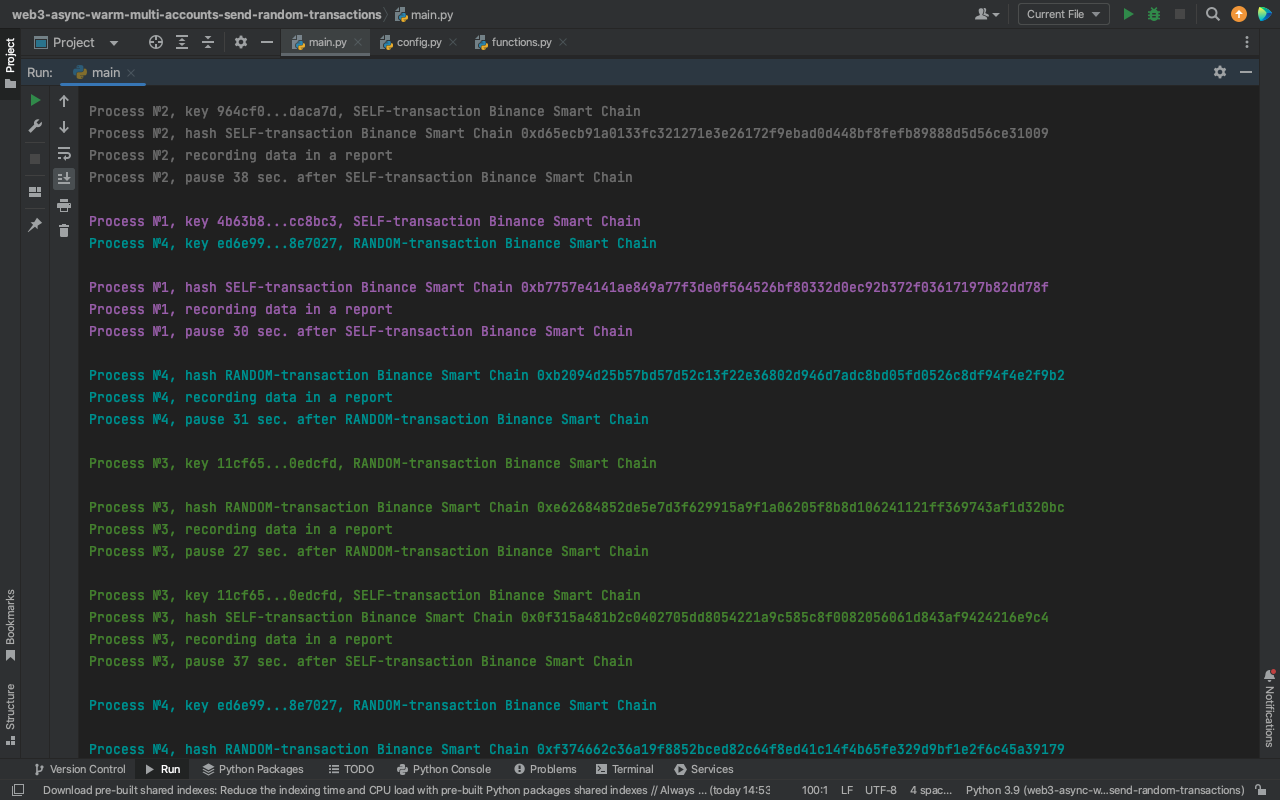
        print(f'{color}Process №{number_of_process}, key {private_key[:6]}...{private_key[-6:]}, {transaction_type} {chain_name}')


        my_address = web3.eth.account.from_key(private_key).address


        transaction_hash = await create_sign_send_transaction(web3, my_address, my_address,

                                                              amount, private_key)


        print(f'{color}Process №{number_of_process}, hash {transaction_type} {chain_name} {transaction_hash}')


        print(f'{color}Process №{number_of_process}, recording data in a report')

        await save_report_to_global_list(chain_name, my_address,

                                         transaction_type, 'SUCCESS',

                                         amount, f'{explorer_url}{transaction_hash}', '-')


        timesleep_value = create_random_value_from_range(min_timesleep_between_transactions,

                                                         max_timesleep_between_transactions)

        print(f'{color}Process №{number_of_process}, pause {timesleep_value} sec. after {transaction_type} {chain_name} ', '\n')

        await asyncio.sleep(timesleep_value)


    except Exception as error:

        print(f'{color}Process №{number_of_process}, {transaction_type} {chain_name}, error -  {error}', '\n')

        await save_report_to_global_list(chain_name, my_address,

                                         transaction_type, 'ERROR',

                                         amount, '-', error)
RANDOM transaction
-
It accepts a connection, the amount of coins to send, a private key, the minimum and maximum delay between transactions, the chain name, and the explorer URL. Unlike the synchronous version, it also takes the process number and color encoding to denote the executing process in the terminal.
-
Before sending, a random number is generated in timesleep_value from a small range, and the script pauses for that duration.
-
A new account is created in account. The public address of the created account, to which the transaction will be sent, is stored in random_wallet. await is not needed.
-
my_address stores the public address, derived from the private key. await is not needed.
-
prepared_wallet stores the created public address, converted to the correct format using to_checksum_address. await is not needed.
-
create_sign_send_transaction handles the sending, using my_address as the sender and receiver. The hash is recorded in transaction_hash.
-
save_report_to_global_list logs the report. It receives the network name, public address, transaction type, SUCCESS status, amount, URL derived from a parameter in chain_settings.py, and transaction hash. If there's no error, a dash is passed.
-
timesleep_value generates a random number from the provided values. The script sleeps.
-
If an except block triggers, the report logs the network name, public address, transaction type, ERROR status, amount, a dash instead of a URL, and the error code.
async def random_transaction(web3, amount, private_key,

                             min_timesleep_between_transactions,

                             max_timesleep_between_transactions,

                             chain_name, explorer_url,

                             number_of_process, color):

    try:

        timesleep_value = create_random_value_from_range(5, 15)

        await asyncio.sleep(timesleep_value)


        transaction_type = 'RANDOM-transaction'

        print(f'{color}Process №{number_of_process}, key {private_key[:6]}...{private_key[-6:]}, {transaction_type} {chain_name}', '\n')


        account = web3.eth.account.create()

        random_wallet = account.address


        my_address = web3.eth.account.from_key(private_key).address

        prepared_wallet = web3.to_checksum_address(random_wallet)


        transaction_hash = await create_sign_send_transaction(web3, my_address, prepared_wallet,

                                                              amount, private_key)


        print(f'{color}Process №{number_of_process}, hash {transaction_type} {chain_name} {transaction_hash}' )


        print(f'{color}Process №{number_of_process}, recording data in a report')

        await save_report_to_global_list(chain_name, my_address,

                                         transaction_type, 'SUCCESS',

                                         amount, f'{explorer_url}{transaction_hash}', '-')


        timesleep_value = create_random_value_from_range(min_timesleep_between_transactions,

                                                         max_timesleep_between_transactions)

        print(f'{color}Process №{number_of_process}, pause {timesleep_value} sec. after {transaction_type} {chain_name} ', '\n')

        await asyncio.sleep(timesleep_value)


    except Exception as error:

        print(f'{color}Process №{number_of_process}, {transaction_type} {chain_name}, error -  {error}', '\n')

        await save_report_to_global_list(chain_name, my_address,

                                         transaction_type, 'ERROR',

                                         amount, '-', error)
Module main.py
Libraries
import asyncio


from web3 import AsyncWeb3


from functions import *

from config import *

import chain_settings
-
asyncio - library for asynchronous programming
-
web3 - connection to RPC, handling transactions on blockchains
-
config - importing all settings from the module
-
functions - importing all functions from the module
-
chain_settings - importing blockchain settings from the module
Producer function
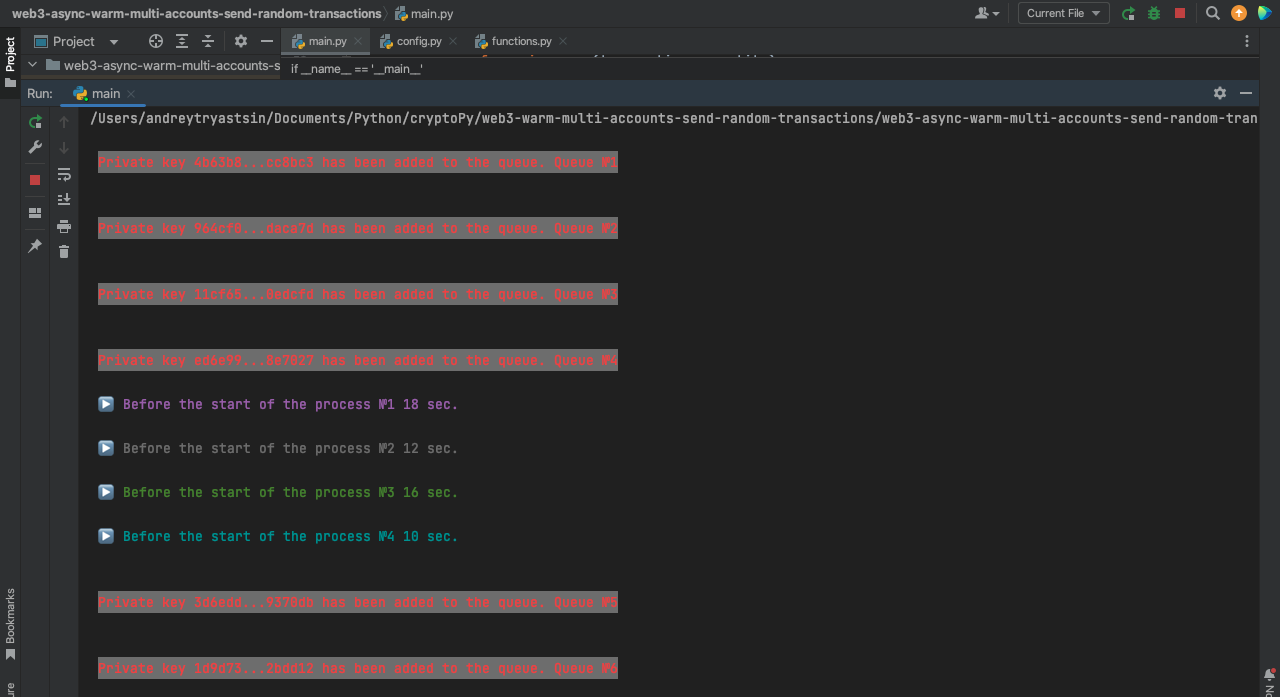
Adds a tuple with the private key and number to the queue. It prints a message indicating that the private key has been added to the queue with a specific number. The message is displayed in red text on a white background:
async def producer(queue, private_key, number):

    await queue.put((private_key, number))

    print('\n', f'\033[31;47mPrivate key {private_key[:6]}...{private_key[-6:]} has been added to the queue. Queue №{number}\033[0m',

          '\n')
Consumer function
-
Takes a queue and a color.
-
Starts an infinite loop.
-
queue.get() retrieves the first object from the queue. The private key is extracted from the tuple and assigned to private_key, and the process number is assigned to process_number.
-
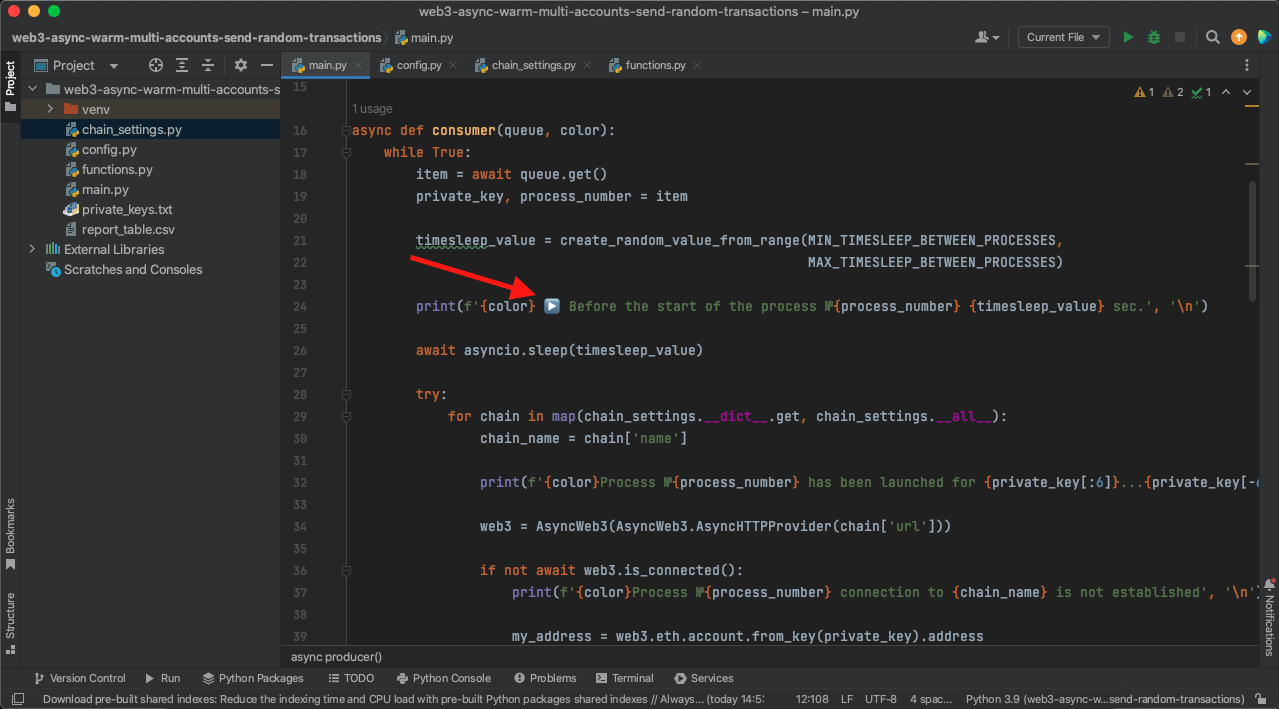
Random value is assigned to timesleep_value from a range specified in config.py. The process pauses before starting, allowing processes to start at different times.
-
Initiates a loop iterating through dictionaries in chain_settings.py specified in __all__.
-
In web3 creates an instance of an asynchronously established connection. If the connection is False (if not web3.is_connected()), the process stops, and the status is recorded in the report. This section of the code generates the public address my_address from the private key for the report.
-
Determines a random number of transactions to be performed in the network and stores it in transactions_quantity. The number is generated from a range specified in the settings in chain_settings.py.
-
Starts a loop based on the number of transactions in transactions_quantity.
-
In amount determines the amount to be sent, using the create_random_amount_for_sending function, which takes the range from chain_settings.py and the number of variations within this range from NUMBER_OF_VARIATIONS_BETWEEN_SENDING_AMOUNT in config.py.
-
Chooses SELF or RANDOM transaction at each iteration.
-
queue.task_done() notifies the queue that the task is done, accessing the private queue variable Queue._unfinished_tasks, decreasing it's value.
-
In case the except block is triggered, it records a report with empty parameters (dashes), the private key, and a message indicating a system error. queue.task_done() notifies the queue that the task is completed.
async def consumer(queue, color):

    while True:

        item = await queue.get()

        private_key, process_number = item


        timesleep_value = create_random_value_from_range(MIN_TIMESLEEP_BETWEEN_PROCESSES,

                                                         MAX_TIMESLEEP_BETWEEN_PROCESSES)


        print(f'{color} Before the start of the process №{process_number} {timesleep_value} sec.', '\n')


        await asyncio.sleep(timesleep_value)


        try:

            for chain in map(chain_settings.__dict__.get, chain_settings.__all__):

                chain_name = chain['name']


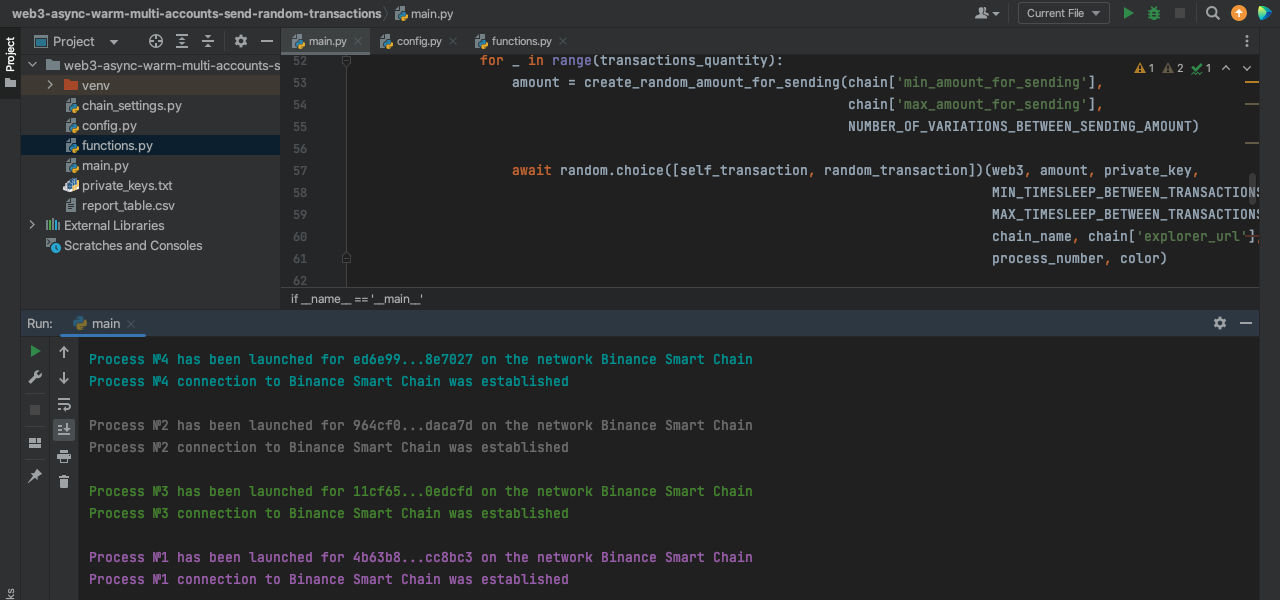
                print(f'{color}Process №{process_number} has been launched for {private_key[:6]}...{private_key[-6:]} on the network {chain_name}')


                web3 = AsyncWeb3(AsyncWeb3.AsyncHTTPProvider(chain['url']))


                if not await web3.is_connected():

                    print(f'{color}Process №{process_number} connection to {chain_name} is not established', '\n')


                    my_address = web3.eth.account.from_key(private_key).address

                    await save_report_to_global_list(chain_name, my_address,

                                                     '-', 'ERROR',

                                                     '-', '-',

                                                     'Connection is not established')

                    await asyncio.sleep(5)

                    continue


                print(f'{color}Process №{process_number} connection to {chain_name} was established', '\n')


                transactions_quantity = create_random_value_from_range(chain['min_transactions'],

                                                                       chain['max_transactions'])


                for _ in range(transactions_quantity):

                    amount = create_random_amount_for_sending(chain['min_amount_for_sending'],

                                                              chain['max_amount_for_sending'],

                                                              NUMBER_OF_VARIATIONS_BETWEEN_SENDING_AMOUNT)


                    await random.choice([self_transaction, random_transaction])(web3, amount, private_key,

                                                                                MIN_TIMESLEEP_BETWEEN_TRANSACTIONS,

                                                                                MAX_TIMESLEEP_BETWEEN_TRANSACTIONS,

                                                                                chain_name, chain['explorer_url'],

                                                                                process_number, color)


            queue.task_done()


        except Exception as error:

            print(error, '\n')

            await save_report_to_global_list('-', private_key,

                                             '-', 'ERROR',

                                             '-', '-',

                                             'Some system error occurred during the process.')

            queue.task_done()
Main function - event loop
-
Queue is created in queue. The maxsize parameter determines the maximum queue size. A specified number of elements is placed into the queue. When these elements are taken for processing, the same number of elements is added back to the queue. In my example, the queue size is equivalent to the number of simultaneously running processes. You can experiment with this parameter or even remove it altogether.
-
pended starts at zero and increments by 1 for each addition of private keys to the queue.
-
Private keys from a txt file are added to the list_of_private_keys.
-
Empty list of producers producers is created. A loop runs through the list of private keys. pended is incremented by 1. Task class object is assigned to task. This places a task into the event loop, a result of the producer function, passing the queue, private key, and pended - the task number in the queue.
-
Empty list of consumers consumers is created. The number of consumers/workers is limited by the NUMBER_OF_PROCESSES parameter in config.py. Task class object is assigned to task. This places a task into the event loop, a result of the consumer function, passing the queue, a color code determined by an index that is randomly selected.
-
The gather function unpacks the list of producers tasks. Producers start creating the queue. Meanwhile, in the consumer function, an infinite loop is running, waiting for the queue and remains in the event loop thanks to create_task.
-
queue.join() interacts with the private variable Queue._unfinished_tasks and waits for the queue to empty. Above, I mentioned that in the consumer function, queue.task_done() decreases the value of this variable.
-
Additionally, to prevent the script from hanging, you can cancel all consumer tasks in the event loop. The loop goes through the list of consumers tasks and cancel() them.
-
Finally, the export_report function creates a dataframe from the global_list_for_report and writes it to a CSV file.
async def main():

    queue = asyncio.Queue(maxsize=NUMBER_OF_PROCESSES)

    pended = 0


    with open(TXT_WITH_PRIVATE_KEYS) as file:

        list_of_private_keys = [line.strip() for line in file.readlines()]


    producers = []

    for private_key in list_of_private_keys:

        pended += 1

        task = asyncio.create_task(producer(queue, private_key, pended))

        producers.append(task)


    consumers = []

    for _ in range(NUMBER_OF_PROCESSES):

        task = asyncio.create_task(consumer(queue, colors[random.choice(range(len(colors)))]))

        consumers.append(task)


    await asyncio.gather(*producers)

    await queue.join()


    for c in consumers:

        c.cancel()


    export_report()
if __name__ == '__main__':

    asyncio.run(main())
How the process is displayed in the terminal
The work has started. Producers created a queue of four private keys - the queue size was limited by the number equal to the amount of consumers. Printed output in red letters on a white background.
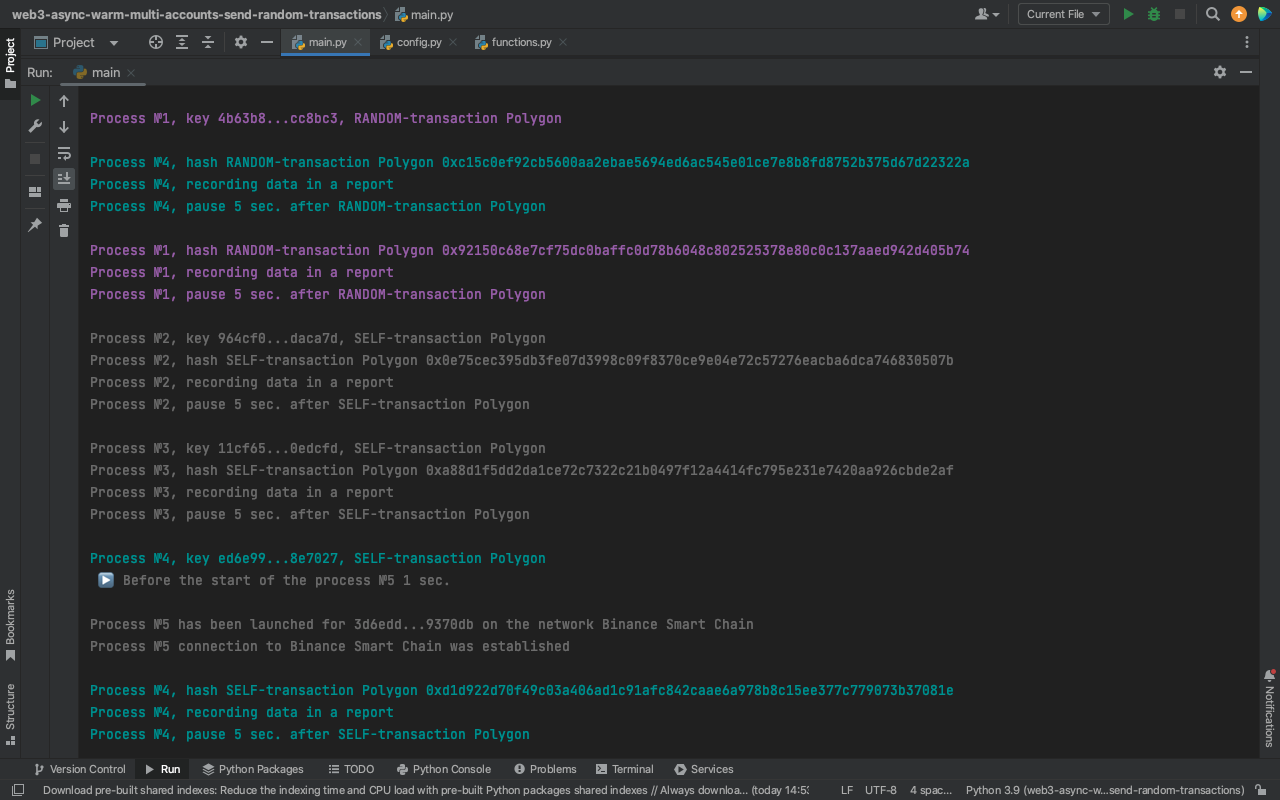
"Listening" to the queue, consumers simultaneously took the private keys into work in an infinite loop. Each process had its delayed start, determined randomly. Each process had its color.
As soon as 4 private keys were taken from the queue, producers immediately added the next batch - 2 private keys because there were only 6 in the list: